Home · Overdrachten · YouTubeSpotify

YouTubeSpotify

Zet afspeellijsten over van YouTube naar Spotify

Verplaats gelikete nummers, favoriete afspeellijsten en albums van YouTube naar Spotify.

Start de overdracht →Gratis voor 600 nummers · geen kaart

★★★★★ 4,8 · 9,2M+ downloads · Wachtwoord nooit gedeeld

Spotify kiezen als bestemming in FreeYourMusicFreeYourMusic mobiel — bestemming kiezen

Waarom overstappen van YouTube naar Spotify?

Wissel van dienst zonder je bibliotheek achter te laten. FreeYourMusic matcht elk nummer en verplaatst het voor je — afspeellijsten, gelikete nummers, albums en gevolgde artiesten.

Alles wordt overgezet

Afspeellijsten, gelikete nummers, albums en artiesten.

Volgorde behouden

Afspeellijsten komen aan in exact de volgorde waarin je ze hebt opgebouwd.

Niets gaat verloren

Onvolmaakte matches worden gemarkeerd voor Rematch met één tik.

Hoe zet je YouTube-afspeellijsten over naar Spotify

1

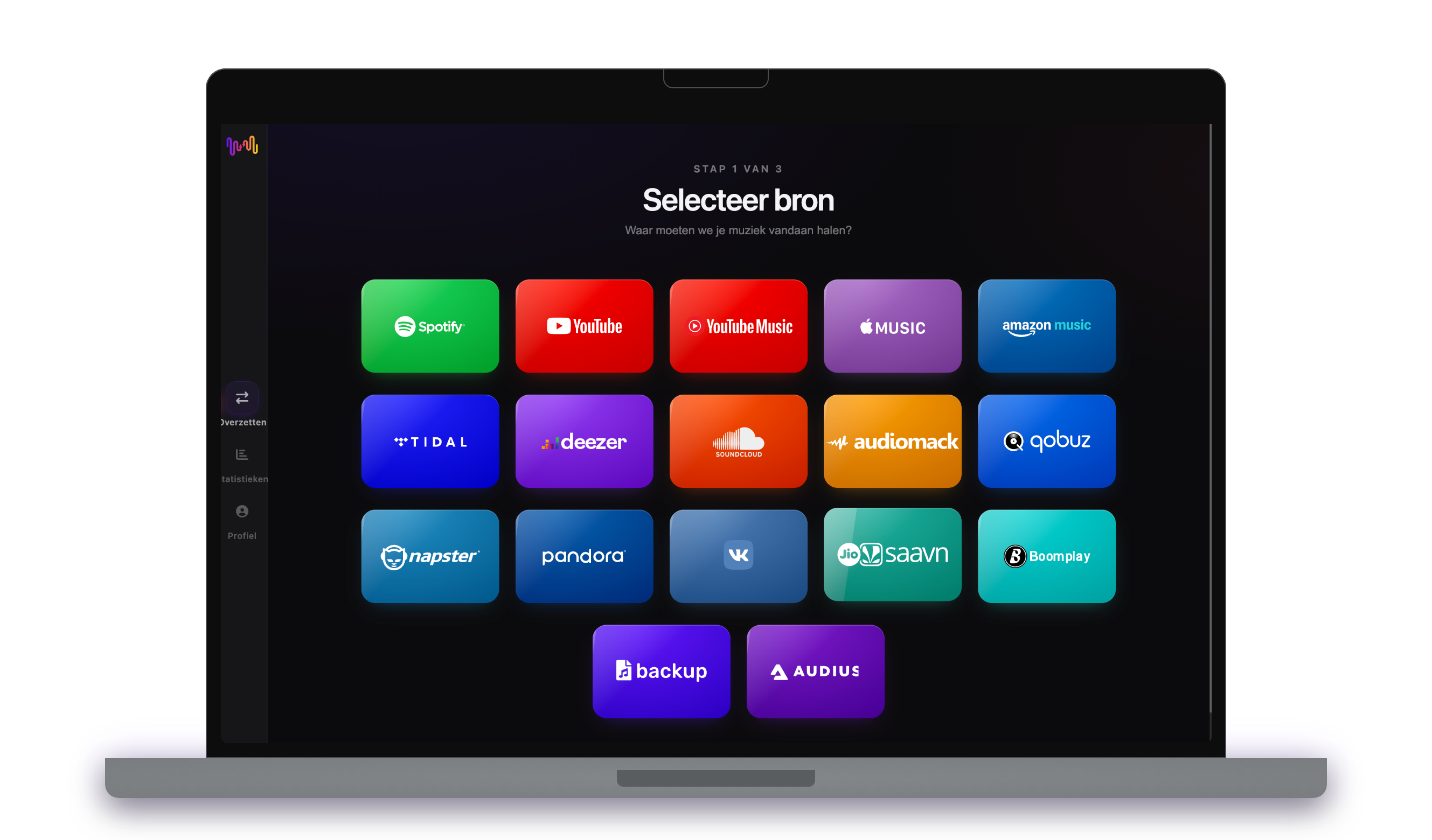
Kies YouTube als bron

Gebruik je huidige YouTube platform als bron en begin met het overzetten van afspeellijsten met Free Your Music.

2

Kies Spotify als bestemming

Kies Spotify als platform waar je een nieuwe afspeellijst wilt maken. Het enige wat je hoeft te doen is op de knop klikken!

3

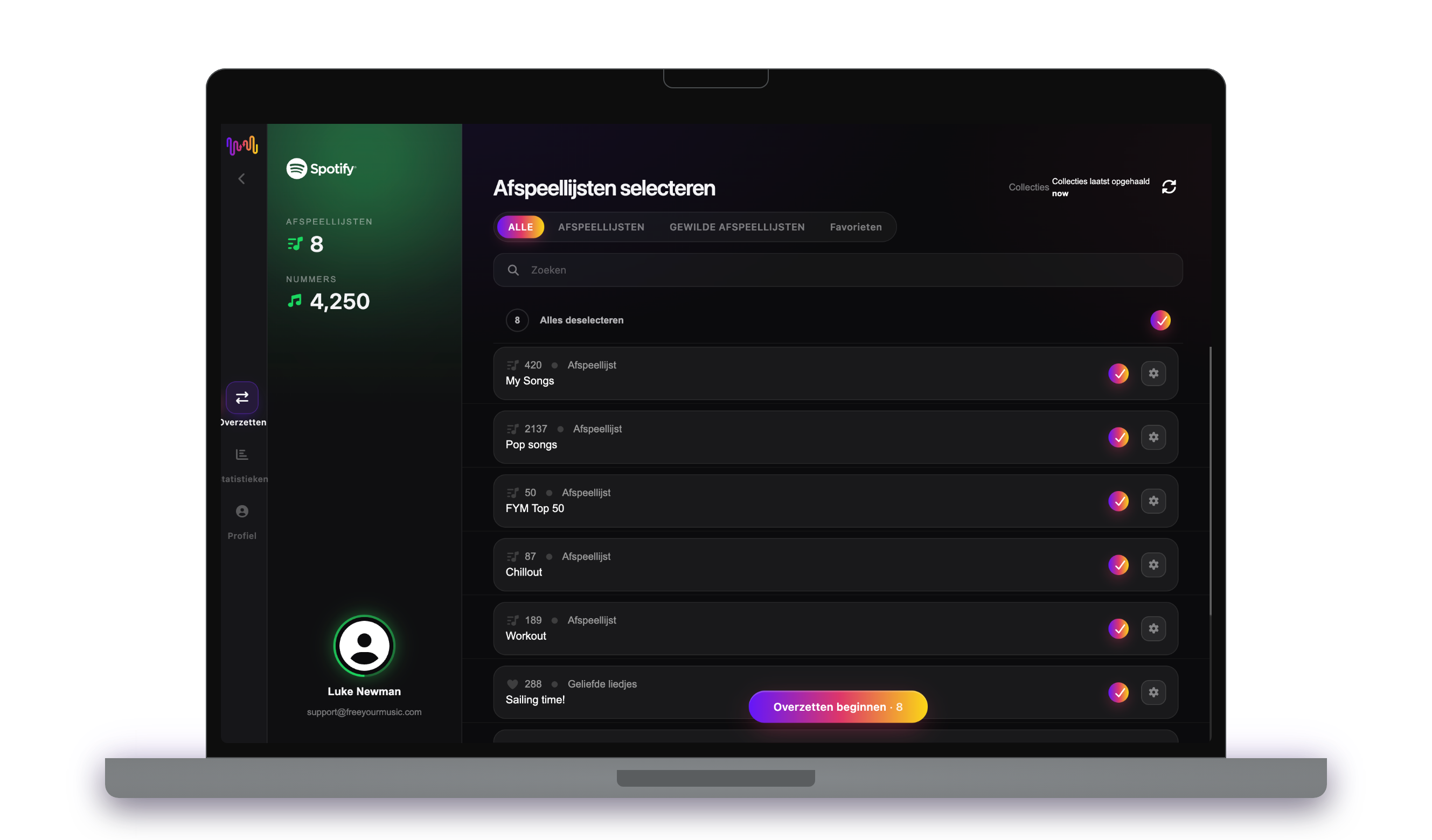
Selecteer afspeellijsten voor een overdracht

Zoek afspeellijsten die je wilt overzetten van YouTube dienst naar Spotify en selecteer alle afspeellijsten die je wilt verplaatsen.

4

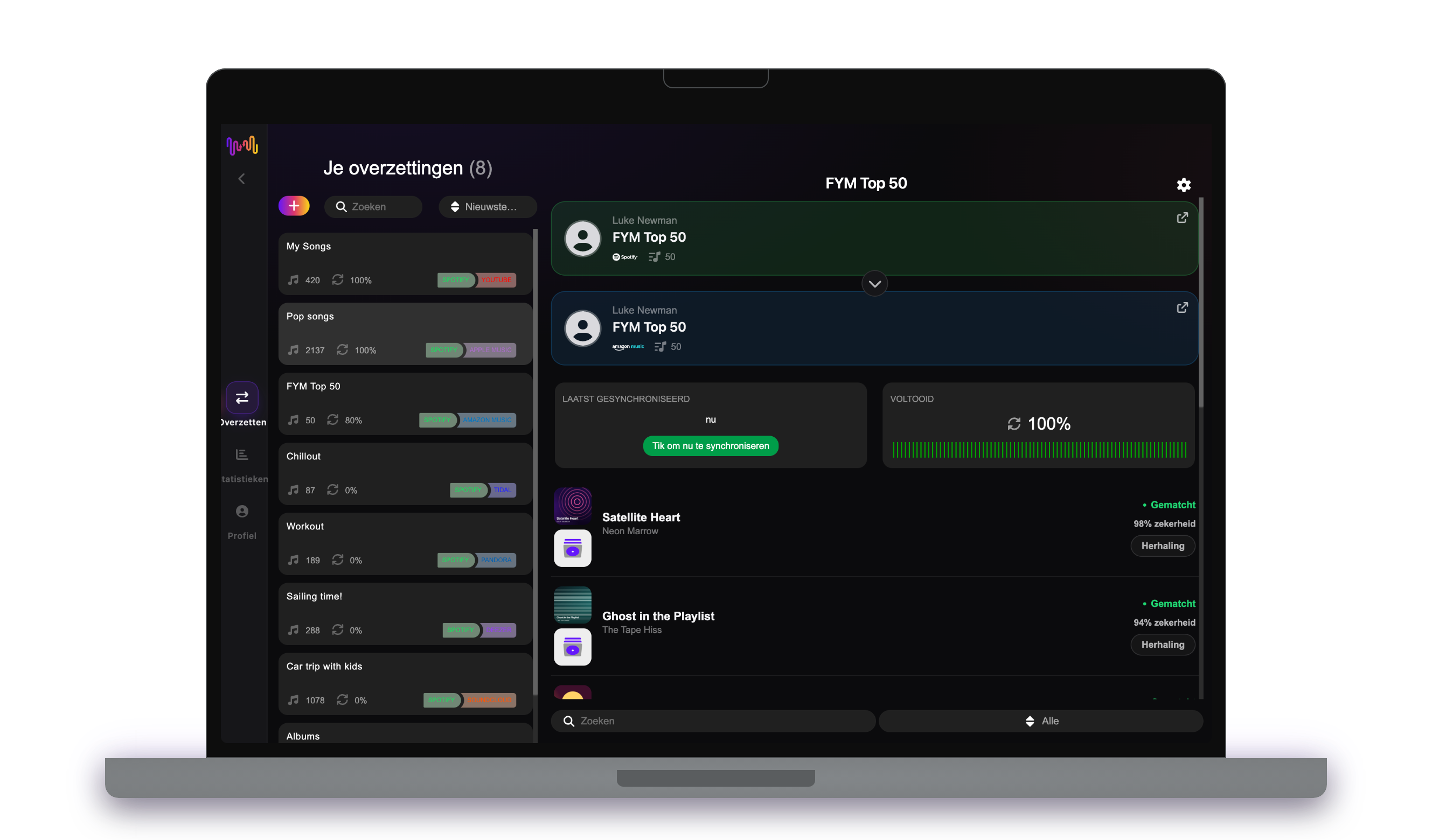
Bevestig je actie en klaar!

Het overzetten is voltooid. Je YouTube afspeellijsten zijn verplaatst naar Spotify en je kunt gaan genieten van je nieuwe muziekstreamingdienst.

Wat wordt overgezet

Afspeellijsten

Gelikete nummers

Opgeslagen albums

Gevolgde artiesten

Op elk apparaat

iPhoneiPadAndroidMacWindowsLinux

Mensen zoeken ook naar

how to transfer YouTube playlist to Spotifytransfer YouTube playlist to Spotifymove YouTube playlist to Spotifycan you transfer YouTube playlist to SpotifyYouTube to Spotify converterimport YouTube playlist to SpotifyYouTube to Spotify playlist transferfree playlist transferplaylist transfer app

Wat wordt er overgezet van YouTube naar Spotify

Alles wat FreeYourMusic met één klik voor je verplaatst — niets handmatig opnieuw opbouwen.

Afspeellijsten (met originele namen + volgorde)
Ondersteund
Gelikete nummers / favorieten
Niet beschikbaar
Opgeslagen albums
Niet beschikbaar
Gevolgde artiesten
Niet beschikbaar
ISRC-gebaseerde exacte track-matching
Niet beschikbaar
Fallback naar titel + artiest-matching

Vertrouwd door miljoenen om afspeellijsten over te zetten van YouTube naar Spotify

4.70 sterren

Gemiddelde waardering

32,5000 beoordelingen

Op iOS en Android

12M0 downloads

Op alle platforms

Moving from YouTube to Spotify, explained

Plenty of people build their real music collection on YouTube — playlists of music videos, favourites saved over years — and then want it as a proper audio library. Moving to Spotify converts those video playlists into a streaming library you can play anywhere, offline included. FreeYourMusic reads your YouTube playlists through Google’s official sign-in and recreates them inside Spotify as matched tracks.

This guide covers what a transfer moves, what cannot come along, how videos are matched to songs, how long it takes, and an honest YouTube versus Spotify comparison. If you just want to start, install FreeYourMusic, connect both accounts and choose what to move — the detail is below.

What transfers to Spotify, and what does not

Your YouTube playlists of music videos become Spotify playlists of tracks, keeping their names and order, and your liked music videos can come across as saved songs. Move everything or pick playlists individually, with counts shown before you commit.

Because YouTube holds far more than music, some entries will not translate. Non-music videos — vlogs, tutorials, clips — have no song to match, and private, deleted or region-blocked videos cannot be read. Live and rare uploads may not have a Spotify counterpart, so those are flagged rather than forced.

How FreeYourMusic matches your tracks

Converting a video library to audio is a matching problem, and FreeYourMusic handles it by reading each video’s title and artist and finding the same recording in Spotify. Where a recording code such as ISRC is available it is used, but YouTube videos often lack one, so title, artist, album and duration do most of the work.

Music videos with messy titles — remix tags, topic-channel labels, live-at-somewhere suffixes — can be ambiguous. FreeYourMusic never silently drops them; anything uncertain is flagged for one-tap Rematch with suggestions, so you can confirm the clean studio version.

How long does a YouTube to Spotify transfer take?

Most transfers finish in minutes. With both accounts connected, around 1,000 items usually completes in under ten minutes. Larger playlists take longer, but the transfer runs on its own — start it and get on with your day.

FreeYourMusic runs natively on iPhone, iPad, Android, Mac, Windows and Linux, so the move is not tied to one machine. Start it on your laptop and follow progress on your phone; it is the same account and the same transfer.

YouTube vs Spotify: what actually changes

This is a shift from a free video platform to a dedicated audio service. On YouTube your music lived as videos, free with ads, mixed in with everything else you watch. Spotify gives you a purpose-built music library — Discover Weekly, Release Radar, offline audio, gapless playback and a free tier of its own.

What you give up is the video itself — live performances and music videos as visuals. But if you mostly wanted the songs, converting your YouTube playlists into a Spotify library turns a loose collection of clips into a proper, portable music catalogue.

Do you need to keep YouTube access while you transfer?

Yes — keep signed in to YouTube until the transfer is finished and checked. FreeYourMusic reads your YouTube playlists while copying them into Spotify, and keeping both live means you never lose track of the source mid-move.

YouTube is free, so nothing needs cancelling, and Spotify has a free tier on the receiving side, so you can land the transfer without paying right away. Both services connect through their own official sign-in, and your password is never shared with FreeYourMusic.

Tips for a clean migration

Before you move, weed out the non-music videos from your playlists so the transfer focuses on actual songs. Move a couple of playlists first and check the matches in Spotify — because the source is video, confirming you got studio recordings rather than covers or live clips is worth the minute.

When the transfer finishes, work through the Rematch list; music-video titles produce more ambiguous matches than a straight audio-to-audio move, so this step matters more here. Then let Discover Weekly build up and download your key playlists for offline listening.

Keeping YouTube and Spotify in sync afterwards

A one-time move is not your only option. If you keep saving music on YouTube, FreeYourMusic’s Auto-Sync mirrors the libraries on a schedule so a video you like becomes a matched track in Spotify without effort.

And the transfer runs the other way too, from Spotify back to YouTube, if you want video versions of your library. Your collection stays portable. Download FreeYourMusic, connect YouTube and Spotify, and see how much comes across — the free tier lets you try first.

Klaar om over te stappen naar Spotify?

Download FreeYourMusic en verplaats je hele bibliotheek in minuten.

Gratis downloaden →

Veelgestelde vragen

Hoe zet ik mijn YouTube-afspeellijst over naar Spotify?

Installeer FreeYourMusic, log in bij YouTube en vervolgens bij Spotify met hun officiële logins, kies de afspeellijsten die je wilt en klik op overzetten. Slimme track-matching verplaatst nummers en hun volgorde intact — een afspeellijst van 1.000 nummers is meestal in minder dan 10 minuten klaar.

Kan ik YouTube-afspeellijsten gratis overzetten naar Spotify?

Ja — de gratis versie verplaatst tot 600 nummers en één afspeellijst zonder kaart nodig. Upgrade voor onbeperkte overdrachten, Auto-Sync en Cloud Backup.

Is er een app om afspeellijsten over te zetten van YouTube naar Spotify?

FreeYourMusic is een afspeellijst-overdrachtsapp voor iPhone, iPad, Android, Mac, Windows en Linux die afspeellijsten, gelikete nummers, opgeslagen albums en gevolgde artiesten verplaatst van YouTube naar Spotify.

Kan ik mijn YouTube-afspeellijsten gratis overzetten naar Spotify?

Ja — FreeYourMusic zet je eerste 600 nummers gratis over van YouTube naar Spotify, inclusief afspeellijsten. Grotere bibliotheken vereisen Premium, en elke overdracht verloopt rechtstreeks tussen je eigen YouTube- en Spotify-accounts.

Wat wordt er precies overgezet van YouTube naar Spotify?

Afspeellijsten (met hun volgorde), gelikte nummers, albums en gevolgde artiesten. Nummers worden nummer voor nummer gematcht met ISRC-codes waar YouTube en Spotify die aanleveren, met titel- en artiestmatching als terugvaloptie — bekijk de compatibiliteitstabel hierboven voor de exacte functielijst van dit paar.

Wat is een afspeellijstoverdracht?

Een afspeellijstoverdracht is het proces van het verplaatsen van je muziekafspeellijsten van de ene streamingdienst naar de andere. In plaats van je afspeellijst handmatig opnieuw samen te stellen, kun je met tools zoals FreeYourMusic afspeellijsten automatisch overzetten, waardoor je tijd en moeite bespaart.

Kan ik afspeellijsten overzetten tussen muziekstreamingdiensten?

Ja! Met FreeYourMusic kun je afspeellijsten overzetten tussen grote diensten als Spotify, Apple Music, YouTube Music, Amazon Music, TIDAL, Deezer en meer.

Moet ik een nieuwe account aanmaken om afspeellijsten over te zetten?

Nee, je hebt geen nieuwe account nodig. Koppel gewoon je bestaande streamingaccounts in de FreeYourMusic-app en je kunt meteen beginnen met het overzetten van je afspeellijsten.

Worden alle nummers perfect overgezet?

Meestal wel, ja. FreeYourMusic gebruikt een slim matchingsysteem om dezelfde of vergelijkbare nummers op verschillende platforms te vinden. Hoewel het zelden voorkomt, kan het zijn dat sommige nummers niet beschikbaar zijn op je nieuwe service en niet worden overgezet.

Bewaart FreeYourMusic de namen en volgorde van mijn afspeellijsten?

Absoluut. Wanneer je afspeellijsten overdraagt, behoudt FreeYourMusic de titels van je afspeellijsten, de volgorde van de nummers en zelfs meerdere afspeellijsten tegelijk.

Hoe lang duurt het om afspeellijsten over te zetten?

Het hangt af van de grootte van je afspeellijsten en de snelheid van je internetverbinding, maar de meeste overdrachten van afspeellijsten duren slechts een paar minuten.

Kan ik afspeellijsten overzetten van een gratis account?

Ja! Je kunt afspeellijsten overzetten van zowel gratis als premium accounts, hoewel sommige streamingdiensten beperkingen kunnen hebben op de toegang.