Home · Trasferimenti · DeezerPandora

DeezerPandora

Trasferisci le playlist da Deezer a Pandora

Sposta i brani preferiti, le playlist e gli album preferiti da Deezer a Pandora.

Avvia il trasferimento →Gratis per 600 brani · nessuna carta

★★★★★ 4,8 · oltre 9,2 milioni di download · Password mai condivisa

Selezione di Pandora come destinazione in FreeYourMusicFreeYourMusic mobile — selezione della destinazione

Perché passare da Deezer a Pandora?

Cambia servizio senza lasciarti indietro la libreria. FreeYourMusic trova la corrispondenza di ogni brano e lo sposta per te — playlist, brani preferiti, album e artisti seguiti.

Si trasferisce tutto

Playlist, brani preferiti, album e artisti.

Ordine mantenuto

Le playlist arrivano nello stesso ordine in cui le hai create.

Niente va perso

Le corrispondenze imperfette vengono segnalate per il Rematch con un tocco.

Come trasferire le playlist da Deezer a Pandora

1

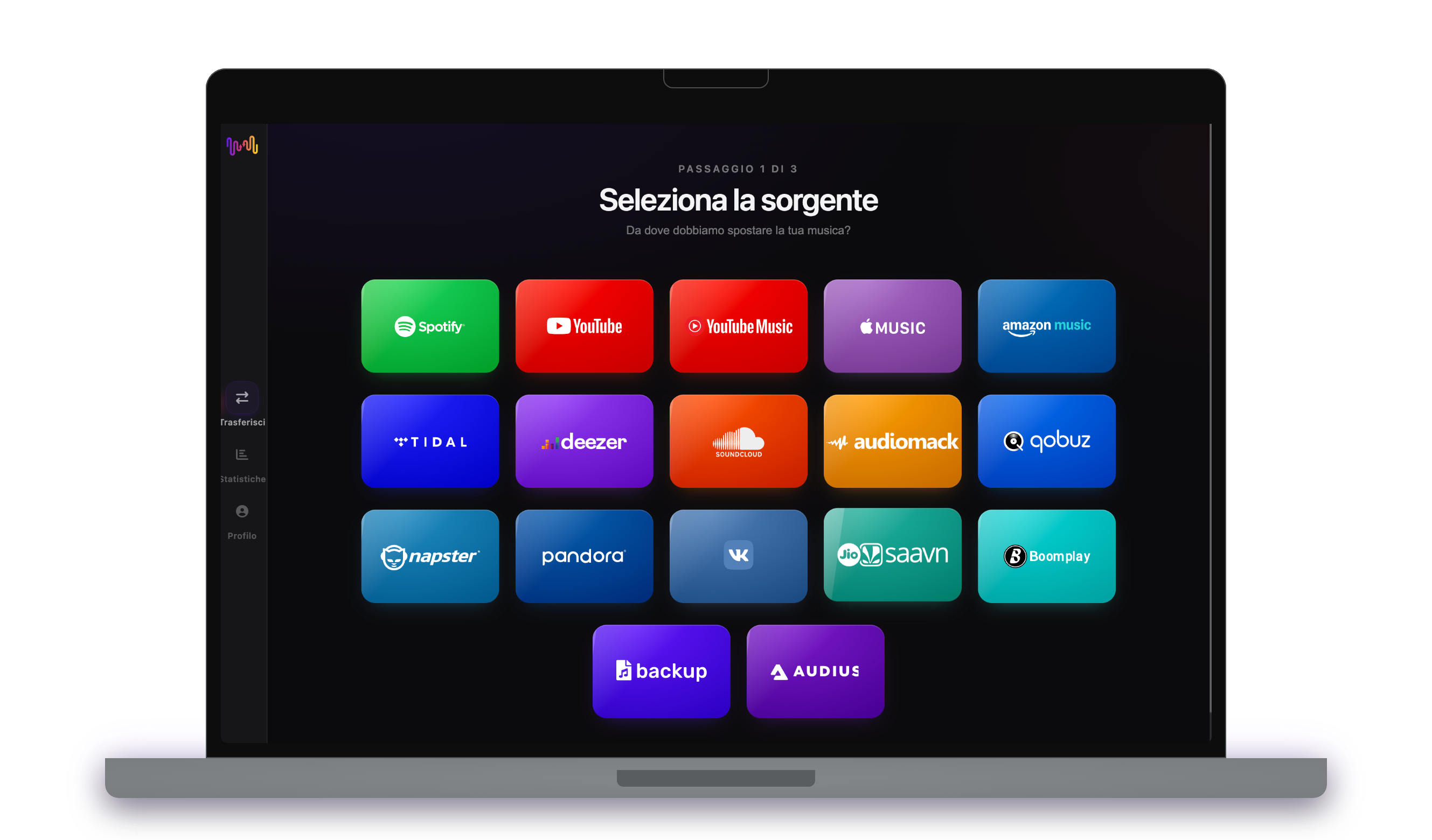
Seleziona Deezer come fonte

Usa la tua attuale piattaforma Deezer come fonte e inizia a trasferire la musica delle playlist con Free Your Music.

2

Selezionare Pandora come destinazione

Selezionare Pandora come piattaforma in cui si desidera creare una nuova playlist. Tutto quello che devi fare è cliccare un solo pulsante!

3

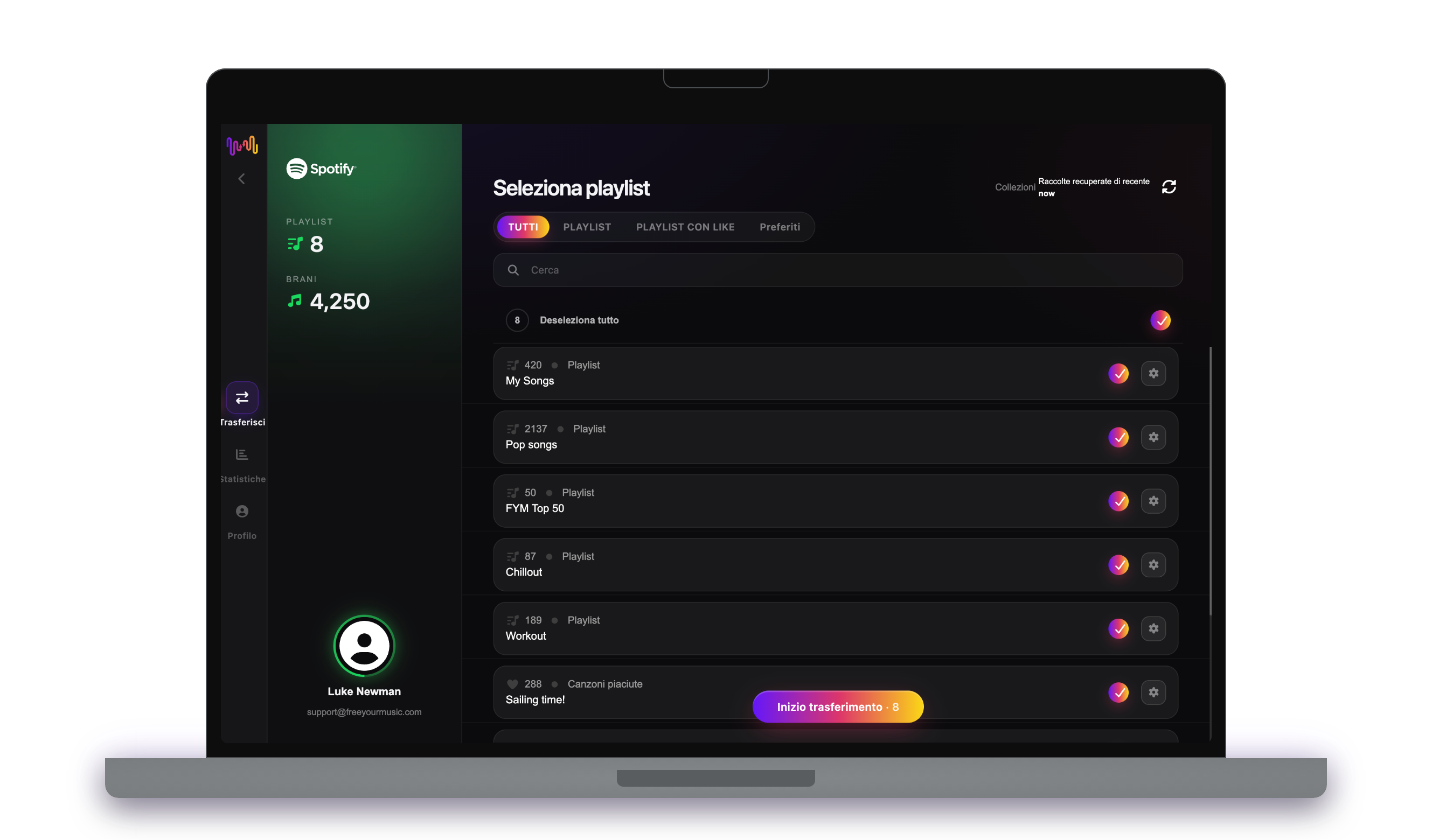
Seleziona le playlist per un trasferimento

Trovare le playlist che si desidera trasferire dal servizio Deezer a Pandora e selezionare tutte le playlist che si desidera spostare.

4

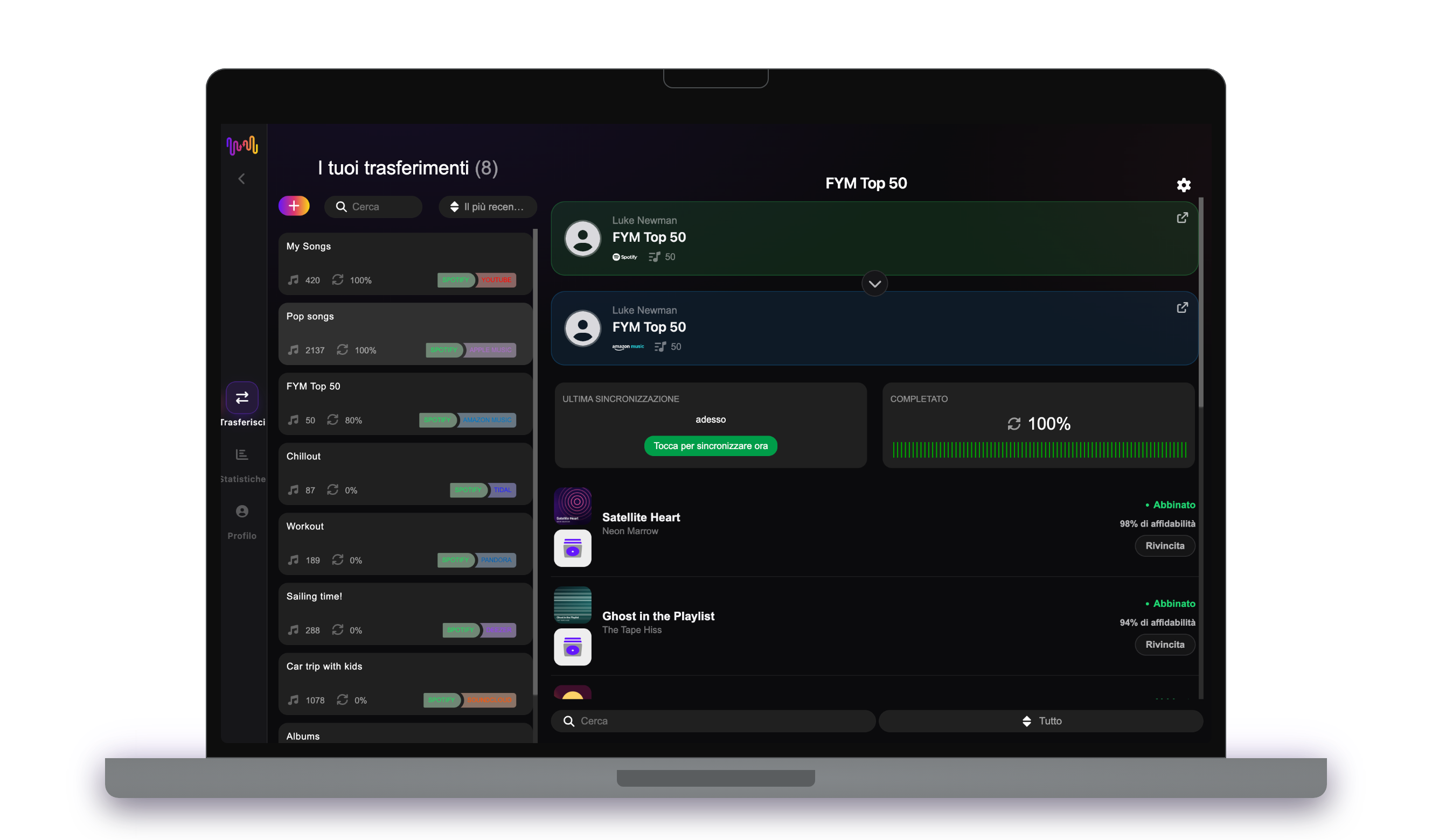
Conferma la tua azione ed è fatto!

Il trasferimento è terminato. Le playlist Deezer sono state spostate su Pandora e si può iniziare a usufruire del nuovo servizio di streaming musicale.

Cosa viene trasferito

Playlist

Brani preferiti

Album salvati

Artisti seguiti

Su ogni dispositivo

iPhoneiPadAndroidMacWindowsLinux

Le persone cercano anche

how to transfer Deezer playlist to Pandoratransfer Deezer playlist to Pandoramove Deezer playlist to Pandoracan you transfer Deezer playlist to PandoraDeezer to Pandora converterimport Deezer playlist to PandoraDeezer to Pandora playlist transferfree playlist transferplaylist transfer app

Cosa viene trasferito da Deezer a Pandora

Tutto quello che FreeYourMusic sposta per te con un clic — niente ricostruzioni manuali.

Playlist (con nomi e ordine originali)
Supportato
Brani preferiti
Non disponibile
Album salvati
Non disponibile
Artisti seguiti
Non disponibile
Abbinamento esatto dei brani basato su ISRC
Non disponibile
Fallback su abbinamento titolo + artista

Apprezzato da milioni di utenti per trasferire playlist da Deezer a Pandora

4.70 stelle

Media delle valutazioni

32,5000 valutazioni

Su iOS e Android

12M0 download

Su tutte le piattaforme

Moving from Deezer to Pandora, explained

Pandora works differently from most services, and that shapes any move into it. Built on the Music Genome Project, Pandora is at heart a radio and stations service — you thumb tracks up and down to shape what plays rather than curating on-demand playlists. FreeYourMusic reads your Deezer library through Deezer’s official sign-in and brings your songs and artists over so Pandora has the right seeds to build from.

This guide explains what transfers, what cannot, how matching works, how long it takes, and how the two services really differ. If you just want to start, install FreeYourMusic, connect both accounts and pick what to move — the detail is below.

What transfers to Pandora, and what does not

FreeYourMusic brings your Deezer tracks, albums and artists across so they can live in Pandora as saved music and seeds for stations. Because Pandora’s model is stations and thumbs rather than fixed playlists, the experience on the other side is naturally more radio-shaped than a like-for-like copy.

Two things to keep in mind. First, Pandora is a US-only service, so you need a US account to receive a transfer. Second, Deezer’s Flow does not follow, uploaded MP3s have no streaming equivalent, and podcasts stay behind.

How FreeYourMusic matches your tracks

Each Deezer track is matched to the same recording in Pandora, preferring the ISRC code the industry assigns and falling back to title, artist, album and duration otherwise. That is how your favourites arrive as the right tracks to build stations around.

Where a track has no exact counterpart, FreeYourMusic flags it for one-tap Rematch instead of dropping it silently. Given Pandora’s stations-first design, getting the right artists and songs in as seeds matters most — they are what its Music Genome uses to shape everything it plays next.

How long does a Deezer to Pandora transfer take?

Most transfers finish in minutes. With both accounts connected, around 1,000 tracks usually completes in under ten minutes. Larger libraries take longer, but the transfer runs on its own — start it and step away.

FreeYourMusic runs natively on iPhone, iPad, Android, Mac, Windows and Linux, so the move is not tied to one device. Start it on your laptop and check progress on your phone; it is the same account and the same transfer.

Deezer vs Pandora: what actually changes

This is the biggest mindset shift of any switch from Deezer. Deezer is about on-demand playlists, Flow and lossless HiFi. Pandora is about stations: you pick a seed, thumb tracks up or down, and its Music Genome learns your taste to spin an endless, personalised radio stream.

Practically, Pandora shines for lean-back listening and discovery within a mood, while Deezer gives you precise control and a global catalogue. Pandora is also US-only, so it suits listeners in the States who prefer radio-style listening over managing a library by hand.

Do you need to keep Deezer while you transfer?

Yes — keep Deezer active until the transfer is finished and checked. FreeYourMusic reads your Deezer library while seeding your Pandora account, and keeping both live means you never lose access mid-move.

Deezer has a free tier, and Pandora offers a free ad-supported tier in the US, with paid Plus and Premium tiers adding on-demand play and offline listening. Both connect through their own official sign-in, and your password is never shared with FreeYourMusic.

Tips for a clean migration

Think in seeds rather than playlists. Bring your most-loved artists and tracks across first, since those are what Pandora uses to build stations that actually sound like you. Tidy your Deezer library beforehand so the seeds reflect your current taste.

When the transfer finishes, resolve the Rematch list, then start thumbing tracks up and down as you listen — Pandora improves quickly once you give it feedback. Consider Pandora Premium if you want on-demand playback rather than the free radio tier.

Keeping Deezer and Pandora in sync afterwards

A one-time move is not your only option. If you keep Deezer for playlists and use Pandora for radio-style listening, FreeYourMusic’s Auto-Sync mirrors your libraries on a schedule so new favourites on one become fresh seeds on the other.

And the transfer runs the other way too, from Pandora back to Deezer, if you want to bring music home. Your collection stays portable. Download FreeYourMusic, connect Deezer and Pandora, and see how much comes across — the free tier lets you try first.

Pronto a passare a Pandora?

Scarica FreeYourMusic e sposta l'intera libreria in pochi minuti.

Scarica gratis →

Domande frequenti

Come trasferisco la mia playlist da Deezer a Pandora?

Installa FreeYourMusic, accedi a Deezer e poi a Pandora usando i rispettivi login ufficiali, scegli le playlist che vuoi e avvia il trasferimento. La corrispondenza intelligente dei brani sposta le canzoni mantenendo l'ordine intatto — una playlist di 1.000 brani si completa in genere in meno di 10 minuti.

Posso trasferire le playlist da Deezer a Pandora gratuitamente?

Sì — il piano gratuito sposta fino a 600 brani e una playlist senza bisogno di carta. Passa a Premium per trasferimenti illimitati, Auto-Sync e Cloud Backup.

Esiste un'app per trasferire le playlist da Deezer a Pandora?

FreeYourMusic è un'app per il trasferimento di playlist per iPhone, iPad, Android, Mac, Windows e Linux che sposta playlist, brani preferiti, album salvati e artisti seguiti da Deezer a Pandora.

Posso trasferire le mie playlist da Deezer a Pandora gratis?

Sì — FreeYourMusic trasferisce gratuitamente i tuoi primi 600 brani da Deezer a Pandora, playlist incluse. Le librerie più grandi richiedono Premium, e ogni trasferimento avviene direttamente tra i tuoi account Deezer e Pandora.

Cosa viene trasferito esattamente da Deezer a Pandora?

Playlist (con il loro ordine), brani che ti piacciono, album e artisti seguiti. I brani vengono abbinati traccia per traccia usando i codici ISRC dove Deezer e Pandora li forniscono, con l'abbinamento per titolo e artista come alternativa: consulta la tabella di compatibilità qui sopra per l'elenco esatto delle funzioni di questa coppia.

Che cos'è il trasferimento di una playlist?

Il trasferimento di una playlist è il processo di spostamento delle playlist musicali da un servizio di streaming a un altro. Invece di ricostruire manualmente le playlist, strumenti come FreeYourMusic consentono di trasferirle automaticamente, risparmiando tempo e fatica.

Posso trasferire le playlist tra i vari servizi di streaming musicale?

Sì! Con FreeYourMusic è possibile trasferire le playlist tra i principali servizi come Spotify, Apple Music, YouTube Music, Amazon Music, TIDAL, Deezer e altri ancora.

Devo creare un nuovo account per trasferire le playlist?

No, non è necessario un nuovo account. È sufficiente collegare gli account di streaming esistenti nell'app FreeYourMusic per iniziare subito il trasferimento delle playlist.

Tutte le canzoni saranno trasferite perfettamente?

Nella maggior parte dei casi, sì. FreeYourMusic utilizza un sistema di corrispondenza intelligente per trovare brani uguali o simili tra le varie piattaforme. È raro che alcuni brani non siano disponibili sul nuovo servizio e non vengano trasferiti.

FreeYourMusic conserva i nomi e l'ordine delle mie playlist?

Assolutamente sì. Quando trasferite le playlist, FreeYourMusic conserva i titoli delle playlist, l'ordine dei brani e persino più playlist contemporaneamente.

Quanto tempo richiede il trasferimento di una playlist?

Dipende dalle dimensioni delle playlist e dalla velocità della connessione a Internet, ma la maggior parte dei trasferimenti di playlist richiede solo pochi minuti.

Posso trasferire le playlist da un account gratuito?

Sì! È possibile trasferire le playlist sia dagli account gratuiti che da quelli premium, anche se alcuni servizi di streaming possono avere limitazioni di accesso.