10 Tips for Transferring Your Music to a Different Streaming Platform
10 Tips for Transferring Your Music to a Different Streaming Platform
How do I transfer my playlists to another music platform?
You can move playlists, liked songs, and albums between streaming services using Free Your Music. It supports all major platforms and transfers your music automatically. No manual work needed. You can back up files, batch transfer hundreds of playlists, sync accounts, and keep your data secure during the switch.
Best way to switch streaming services:
Before switching, review what music you actually want to keep, back up your files, and use Free Your Music to move everything in one go. Auto-sync keeps both accounts updated while you test the new platform, and any missing tracks get flagged so you can replace them.
Switching streaming platforms feels like packing up your life for a big move: stressful, time-consuming, and full of "What if I forget something?" moments. Or worse, "What if I lose something?"
That's especially true after all the hours you spent turning your playlists into something you're just not prepared to lose (we know we aren't).
But here's the good news: it doesn't have to be complicated or technical. No panic, no lost playlists. Just you and your music, ready to move.
With us, you can keep your music when you move platforms.
Download Free Your Music for Free
1. Know What You Want to Keep
Not everything in your music library deserves a second life on a new platform. Are you a secret song skipper?
Do a quick audit. Which playlists are your go-to? What songs can you live without (those are the ones you're skipping anyway)? By choosing carefully, you're only taking what you actually like. For some of you, that means you'll only need the free option.
The bigger bonus: your new platform can serve up more polished daily discoveries and new music mixes for you. It's one of the best ways to get music you actually like onto the algorithm.
We have a guide on how you can sort your music.
2. We Do the Hard Work for You
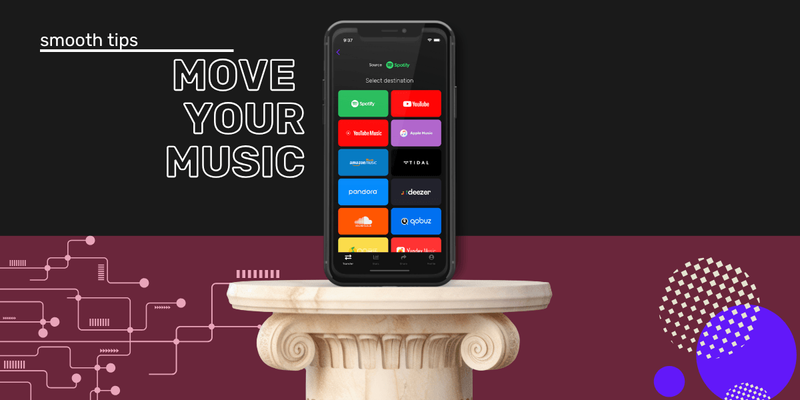
Transferring playlists manually? Nope. We handle everything: playlists, favorite tracks, even albums. We get it done faster than you can say "endless scroll."
Plus, we support all major streaming platforms, so you're covered no matter where you're going.
Is this a tip? Kind of. Our tip: check out all our available services. You don't need to stick with Spotify or Apple Music. There are many other music streaming services worth trying. Qobuz, Deezer, TIDAL, and Amazon Music all make great options.
3. Sync Securely and Stress-Free
Privacy is non-negotiable. We make sure your data stays yours.
Connect your accounts securely, and we'll take care of the rest, like having a personal assistant for your music. Fancy.
More seriously: our tech is top-notch. MusicAPI keeps everything under lock and key for you. The sign-in step is what lets us make the transfer happen.
4. Batch Your Transfers for Maximum Efficiency
Got a decade's worth of playlists? Don't worry, so do a few of our team members. Our bulk transfer options save you hours of frustration. Think of it as the express lane for your music.
Select as much music as you want with our unlimited premium plan, and off it goes. Even with a couple of Rematch tracks along the way, it's still a lot faster than manual mode.

Translation: this app makes it easy to transfer your favorite music and all the playlists you built on your old platform, once you decide to switch services. The interface is simple: log in to your old and new music service, select the playlists you want to migrate, and you're done! 😁 It can take up to 40 minutes to transfer 3,500 favorites. 😅
Imagine doing that manually? No, we can't either.
5. Understand Music Platforms' Catalog Gaps
No two platforms catalog songs the same way. But our smart matching keeps your playlists as intact as possible.
Got a rare remix or niche artist? We'll find the closest match, so your new music service feels just like home.
Not all music streaming services are equal, though. In 8 out of 10 cases, you won't find that niche underground track from SoundCloud on Spotify. You might not find big chart-topping Apple Music artists either if you switch elsewhere, not to mention exclusives. Rematch does the heavy lifting, but some tweaks might be needed.
6. Back It Up Before You Switch
Want extra peace of mind? Export your playlists as offline backups. That's your safety net in case anything goes sideways.
We also offer File Backup, so you can make the most of that too. DJs love this option as one of their fail-safes for keeping their sets secure.
7. Keep Both Accounts in Sync
Not ready to fully commit to your new platform? We always recommend using the free trial as much as you can. It helps you get to know your new music platform better. Our auto-sync feature updates your playlists automatically every 15 minutes.
Your playlists stay updated across platforms, giving you time to adjust. Whatever you add to your master playlist (the original on your old source platform) syncs to your new platform too.
You can pause syncing anytime you don't need it.
8. Handle Missing Tracks Like a Pro
Sometimes licensing differences mean a few songs won't make the leap. We flag these for you, so you can track them down manually or find similar options on your new platform.
Unfortunately, we can't do anything about songs that simply aren't on your new platform.
9. Follow Our Lead
Our step-by-step guides take the guesswork out of transferring your library. An intuitive design means you'll be done before you know it, without breaking a sweat.
We always recommend reading the pop-ups that people love to swipe away. They're your window to the information you need.
10. Lean on Us When You Need Help
Confused? Stuck? We're just a click away. Whether it's troubleshooting or tips, our support team makes sure your transition goes off without a hitch.
It might be tempting to leave us a bad review when something isn't going quite right. But our priority is your experience. When you give us feedback directly by email, our team gets to work on it right away. That makes things better for everyone.

Bonus: A Fresh Start for Music Discovery
Once your music has settled in and you're exploring your new platform a bit more, you'll start getting music suggestions. Here are some great ways to boost your music discovery: 7 Ways to Find New Music.
Keep your playlists when you switch platforms. Get our app, move up to 600 songs for free, and upgrade when you need more.
Simple, effective playlist transfer.

Your playlists belong to you.
Stop rebuilding by hand. Move everything in minutes and take your music wherever you go.
Download free →SongsBrew — our free music newsletter
A free perk for FYM users. Tips, playlists, no spam.