

Transfer Apple Music to Deezer
Move your playlists, liked songs, and saved albums from Apple Music to Deezer without rebuilding anything by hand. Connect both accounts, pick what to move, and Free Your Music recreates it on Deezer with the same names and song order.
★★★★★ 4.7 · 12M+ downloads · Password never shared


Why move from Apple Music to Deezer?
Free Your Music moves your playlists, liked songs, and saved albums from Apple Music to Deezer. It matches the songs one by one and lists anything that is not on Deezer, so you can fix it before you switch.
Supported transfers
Playlists (with original names + order), Liked songs / favorites, and Saved albums
Review missing tracks
Catalogs differ. Review the transfer results for tracks that could not be matched on the destination service.
How to transfer playlists from Apple Music to Deezer
Four steps. The same on iPhone, Android, Mac, Windows and Linux.
Quick answer
To transfer Apple Music to Deezer, install Free Your Music, select Apple Music as the source and Deezer as the destination, choose the playlists you want, and start the transfer. The app finds each song on Deezer and lists any track it could not match.
- 1
Connect Apple Music as the source
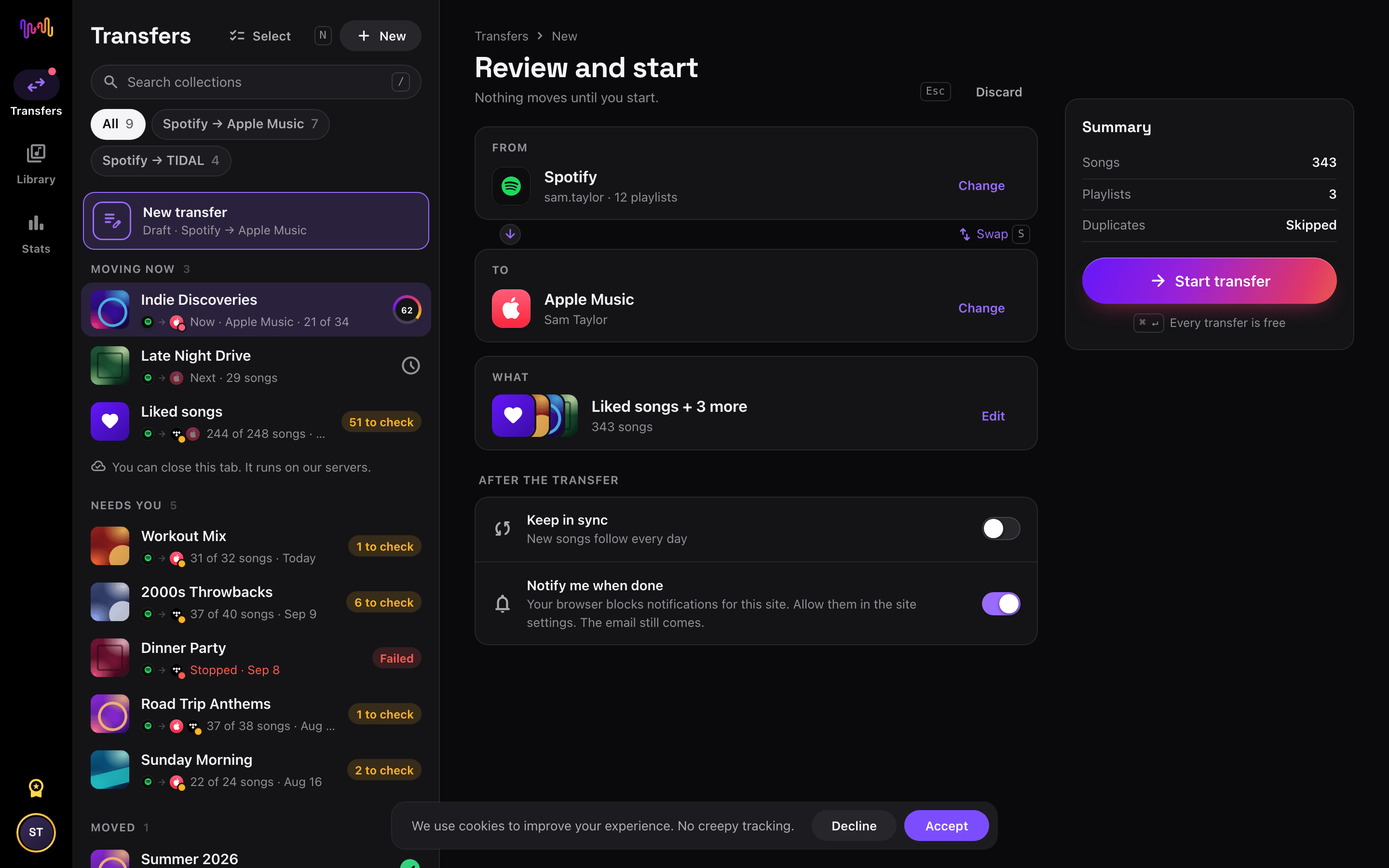
Open Free Your Music, tap the Apple Music tile on the "Select source" screen and sign in on the Apple Music sign-in page. Free Your Music does not store your Apple Music password.
- 2
Choose Deezer as the destination
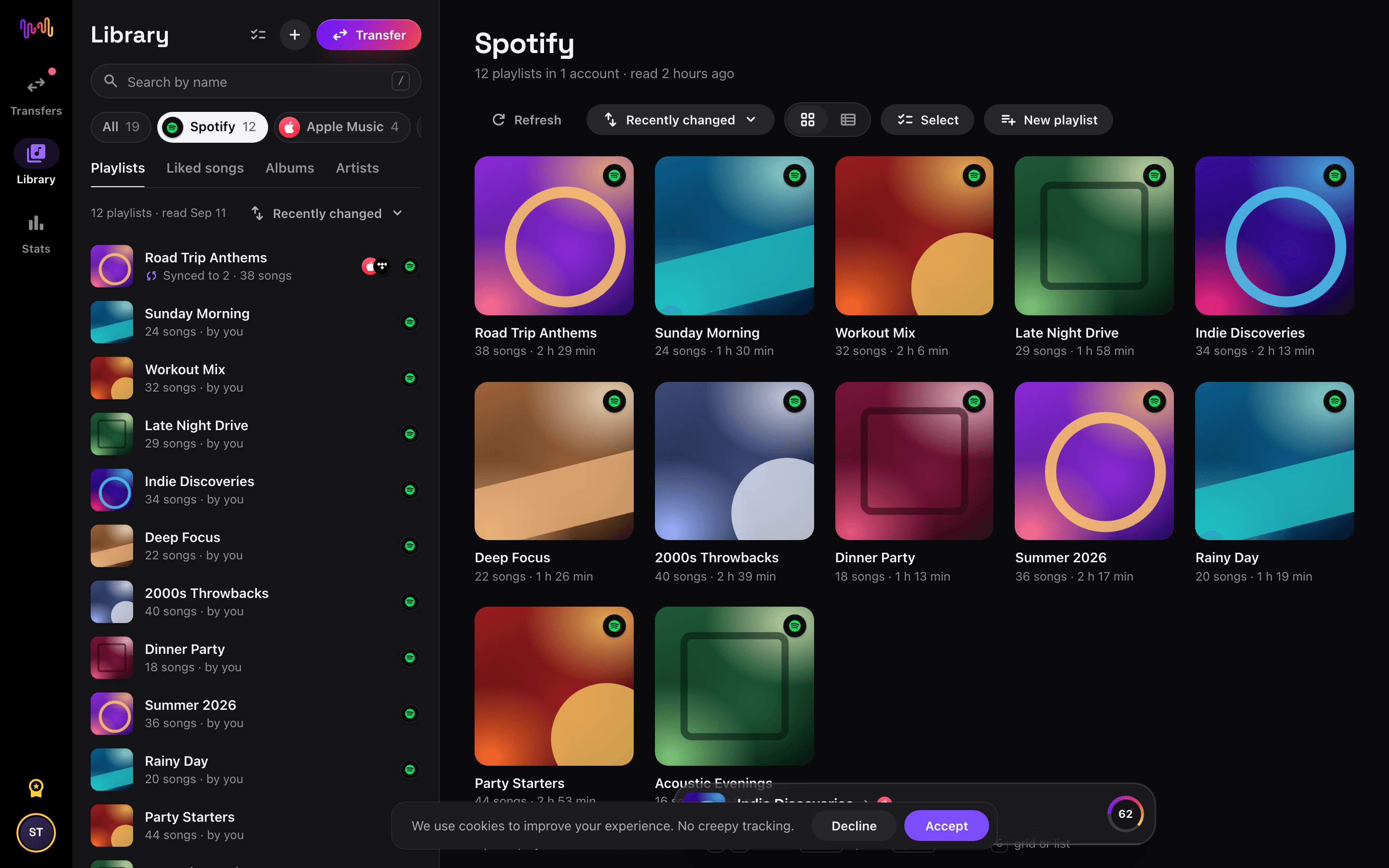
On the "Select destination" screen, tap Deezer and sign in. Free Your Music needs access to your Deezer library to create the playlists there.
- 3
Select what to move
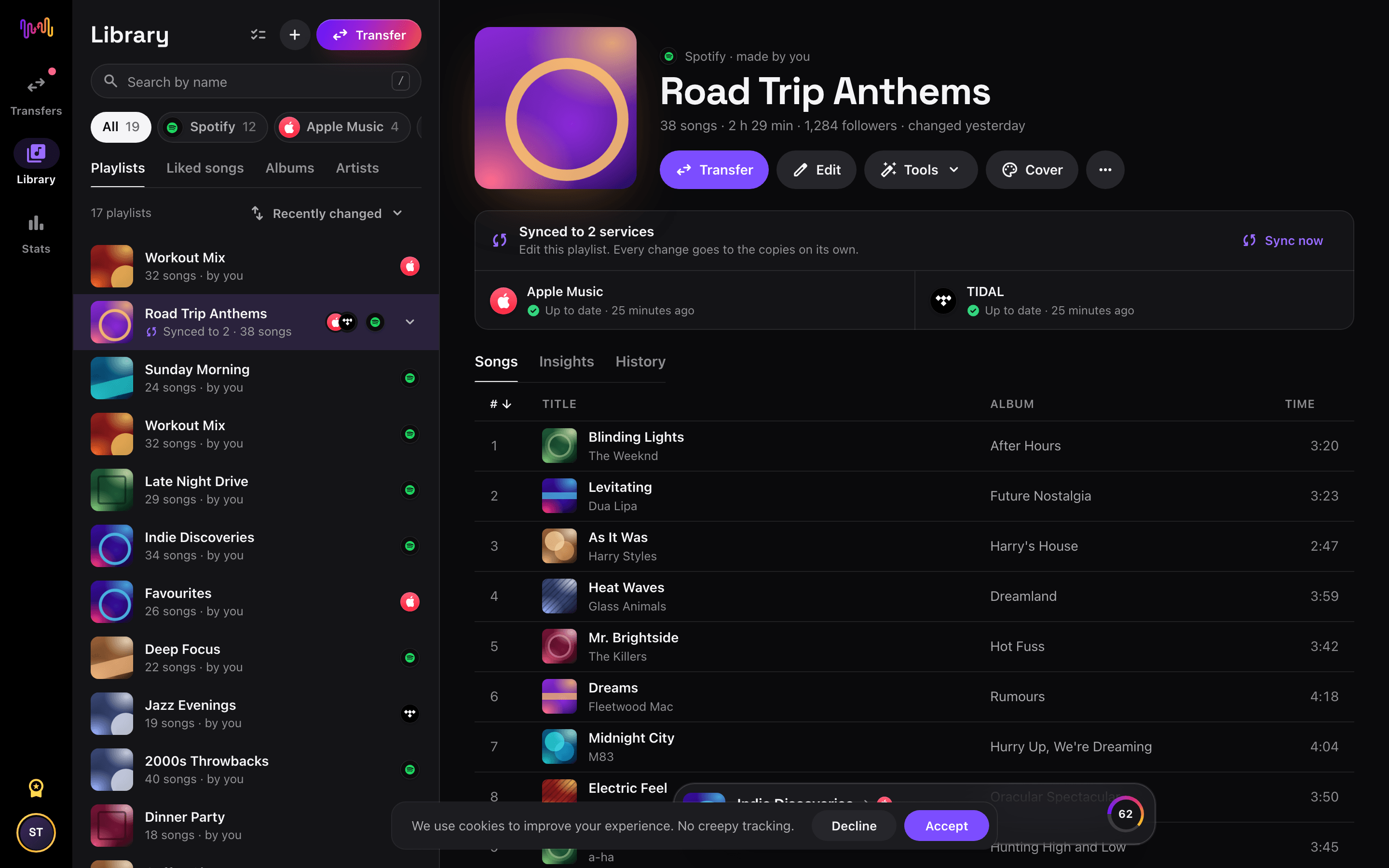
Tick the playlists you want on Deezer. Use the filters and the search field to find them, or select everything to move your whole Apple Music library at once.
- 4
Start the transfer and check the results
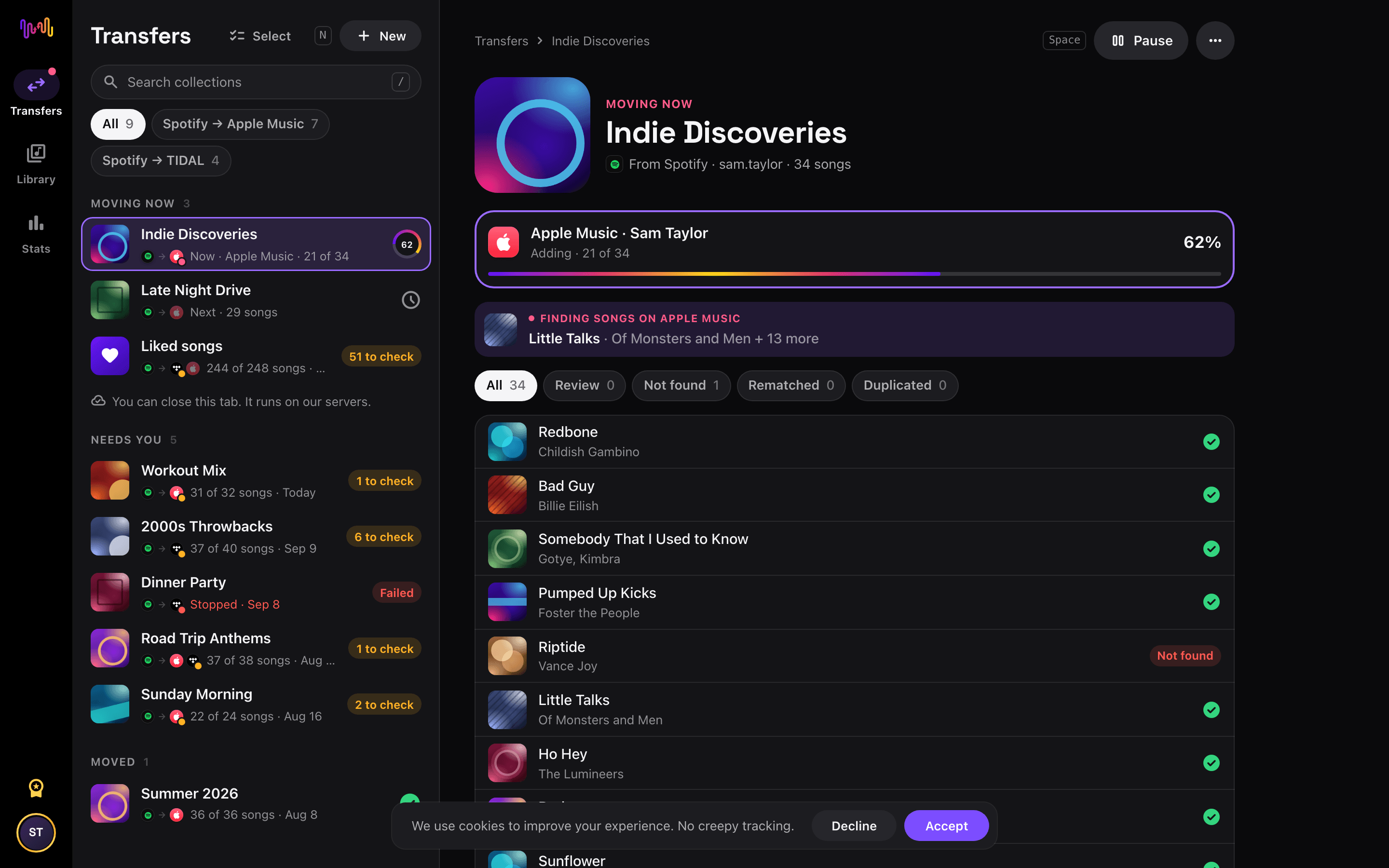
Tap "Begin transfer". Free Your Music matches every song on Deezer, keeps the playlist names and the song order, and shows a confidence score for each match. Use Rematch to fix any song it could not find.


Apple Music to Deezer with Siri Shortcuts
Move a Apple Music playlist to Deezer from its link. You build no new playlist by hand.
- In Apple Music, tap Share on a playlist, then Copy link.
- Run the Transfer a link shortcut of Free Your Music and pick Deezer.
- The whole playlist moves to Deezer. We tell you when it is done.
Watch your Apple Music to Deezer transfer from your Home Screen
Start the transfer, close the app and follow it on your Home Screen or Lock Screen. The transfer widgets are free.
- Moving now shows how many songs are on Deezer already.
- Last transfer takes you to the songs to check, in one tap.
This transfer is free
Every transfer from Apple Music to Deezer is free in your browser and in the new iPhone and Android apps. No song limit, no card.
Keep them in sync
Still use both? Turn on auto-sync. New songs on Apple Music reach Deezer once a day.
Deezer playlist tools
Good to know before you move Apple Music to Deezer
Apple Music as the source
Some features need an active Apple Music subscription. Turn smart playlists into normal playlists in the Music app before you transfer them.
Read the Apple Music guide →Deezer as the destination
One Deezer playlist holds at most 2,000 songs from a transfer. Free Your Music splits longer playlists into parts.
Read the Deezer guide →What transfers from Apple Music to Deezer
On every device
Move, convert or import: one transfer from Apple Music to Deezer
Whatever you call it, it is the same job. You can move your Apple Music playlists to Deezer, convert a Apple Music playlist into a Deezer playlist, or import your Apple Music library into Deezer. Free Your Music does all three in one transfer, for one playlist or for a library of thousands of songs.
Keep Apple Music and Deezer in sync
Still adding songs on Apple Music? With Pro, Auto-Sync checks your transferred playlists and adds new songs to Deezer automatically, so both libraries stay the same. Pricing →
Move Apple Music to another service


See every Apple Music transfer →
Transfer to Deezer from another service
Moving from Apple Music to Deezer, explained
Deezer pairs a genuinely global catalogue with strong regional coverage, its Flow personalised mix, lossless HiFi in FLAC and dependable synced lyrics. Moving from Apple Music keeps your collection while giving you those extras. Free Your Music reads your Apple Music library through Apple’s official sign-in and rebuilds your playlists, liked songs and saved albums inside Deezer.
This guide runs through what transfers, what cannot, how songs are matched, how long it takes, and how the two services really differ. If you just want to start, install Free Your Music, connect both accounts and pick what to move — the detail is below.
What transfers to Deezer, and what does not
Your playlists move with names and order preserved, liked songs arrive as favourites and saved albums come across. Followed artists do not carry over. Move everything or choose playlists individually, with counts shown before you commit.
Some things cannot follow. Apple’s editorial mixes and Replay are unique to Apple Music; Deezer’s own Flow is a separate feature you build up over time on the other side. Podcasts stay in Apple’s separate app, and local iTunes files have no streaming equivalent to match into Deezer.
How Free Your Music matches your tracks
Each Apple Music song is matched to the same recording in Deezer, preferring the ISRC code assigned to every recording and falling back to title, artist, album and duration otherwise. Deezer’s catalogue is large and broadly comparable, so match rates tend to be high.
No two catalogues are identical, so the occasional regional exclusive or unusual edition may lack a perfect counterpart. Free Your Music never silently drops a track — anything uncertain is flagged for one-tap Rematch with suggestions, so you keep control over every substitution.
How long does an Apple Music to Deezer transfer take?
Most transfers finish in minutes. With both accounts connected, around 1,000 tracks usually completes in under ten minutes. Larger libraries take longer, but the transfer runs on its own — start it and get on with your day.
Free Your Music runs on iPhone, iPad and Android, and in the browser on any Mac, Windows or Linux computer, so the move is not tied to one machine. Start it on your Mac and follow progress on your phone; it is the same account and the same transfer.
Apple Music vs Deezer: what actually changes
Both offer lossless — Apple Music with hi-res and Spatial Audio, Deezer with HiFi in FLAC — so the audio gap is small. Deezer’s signature is Flow, an endless personalised mix, along with strong regional coverage in many markets and reliable synced lyrics.
What shifts is the ecosystem. Apple Music is woven into Siri, HomePod and the Apple world, with Replay each year. Deezer is platform-agnostic and leans on Flow for discovery. If you want comparable breadth and audio without being tied to Apple hardware, Deezer is an easy landing spot.
Do you need to keep Apple Music while you transfer?
Yes — keep Apple Music active until the transfer is finished and checked. Free Your Music reads your Apple Music library while copying it into Deezer, and keeping both live means you never lose access mid-move. Cancel Apple Music only once you are satisfied.
Deezer has a free tier, so you can receive a transfer without paying, while its HiFi tier unlocks lossless FLAC. Both services connect through their own official sign-in, and your password is never shared with Free Your Music.
Tips for a clean migration
Tidy your Apple Music playlists first so you carry only what you actually play. Because the catalogues are broadly similar, match quality is usually strong, but transferring a couple of playlists first and checking them in Deezer still builds confidence quickly.
When the transfer finishes, resolve any flagged tracks in the Rematch list, then let Flow learn your taste by playing it for a while. Turn on HiFi in settings for lossless, and download your key playlists for offline listening.
Keeping Apple Music and Deezer in sync afterwards
A one-time move is not your only option. If you are trialling Deezer while keeping Apple Music, Free Your Music’s Auto-Sync mirrors the two libraries on a schedule so a song you like on one appears on the other without effort.
And the transfer runs the other way too, from Deezer back to Apple Music, if you change your mind. Your library stays portable. Download Free Your Music, connect Apple Music and Deezer, and see how much comes across — every transfer is free, with no song limit.
Frequently asked questions
How do I transfer my Apple Music playlist to Deezer?
To transfer Apple Music to Deezer, install Free Your Music, select Apple Music as the source and Deezer as the destination, choose the playlists you want, and start the transfer. The app finds each song on Deezer and lists any track it could not match.
What exactly transfers from Apple Music to Deezer?
Free Your Music moves your playlists, liked songs, and saved albums from Apple Music to Deezer. It matches the songs one by one and lists anything that is not on Deezer, so you can fix it before you switch.
Can Apple Music move my playlists to Deezer?
No. The Apple Music import tool only brings music into Apple Music. It cannot send your playlists to another service. To move your Apple Music playlists to Deezer, use Free Your Music.
Can I transfer Apple Music playlists to Deezer for free?
Yes. Every transfer from Apple Music to Deezer is free: your playlists, liked songs, and saved albums, with no song limit and no card. Rematch and 30 days of Stats are free too. Pro keeps Apple Music and Deezer in sync every day and adds the playlist tools and playlist insights.
What happens to songs that are not on Deezer?
Catalogs differ between services and regions. Free Your Music lists every song it could not match on Deezer, so you can pick another version with Rematch or skip it. Nothing is dropped without you seeing it.
Will my Apple Music playlists be deleted?
No. Free Your Music copies your music to Deezer and leaves your Apple Music library as it is. You decide later whether to keep or cancel your Apple Music account.
How long does a Apple Music to Deezer transfer take?
Most playlists move in a few minutes. Large libraries take longer, because the time depends on the number of songs and on the limits of Apple Music and Deezer. You can keep using your device while the transfer runs.
Can I transfer Apple Music to Deezer on my phone?
Yes. Free Your Music runs on iPhone, iPad and Android, and in the browser on any Mac, Windows or Linux computer. The steps are the same on every device.
Is there a Apple Music to Deezer shortcut?
Yes. On iPhone, copy a Apple Music playlist link and run the free Transfer a link shortcut of Free Your Music. It moves the playlist to Deezer. You can also ask Siri to do it for you.
Can I follow my Apple Music to Deezer transfer on my Home Screen?
Yes. Add the free Free Your Music Moving now widget. It shows how many songs are on Deezer already, and the free Last transfer widget takes you to the songs to check when it is done. The widgets work on iPhone and Android.
Find new music for your new library
Deep cuts every Thursday, free. SongsBrew is our weekly music letter: one subject in depth and a playlist at the bottom. 25,000+ readers.
Ready to move to Deezer?
Open Free Your Music on the web or on your phone and move your whole library in minutes. Every transfer is free. No card.
Move my music free →