

Transfer Spotify to Apple Music
Move your playlists, liked songs, and saved albums from Spotify to Apple Music without rebuilding anything by hand. Connect both accounts, pick what to move, and Free Your Music recreates it on Apple Music with the same names and song order.
★★★★★ 4.7 · 12M+ downloads · Password never shared


Why move from Spotify to Apple Music?
Free Your Music moves your playlists, liked songs, and saved albums from Spotify to Apple Music. It matches the songs one by one and lists anything that is not on Apple Music, so you can fix it before you switch.
Supported transfers
Playlists (with original names + order), Liked songs / favorites, and Saved albums
Review missing tracks
Catalogs differ. Review the transfer results for tracks that could not be matched on the destination service.
How to transfer playlists from Spotify to Apple Music
Four steps. The same on iPhone, Android, Mac, Windows and Linux.
Quick answer
To transfer Spotify to Apple Music, install Free Your Music, select Spotify as the source and Apple Music as the destination, choose the playlists you want, and start the transfer. The app finds each song on Apple Music and lists any track it could not match.
- 1
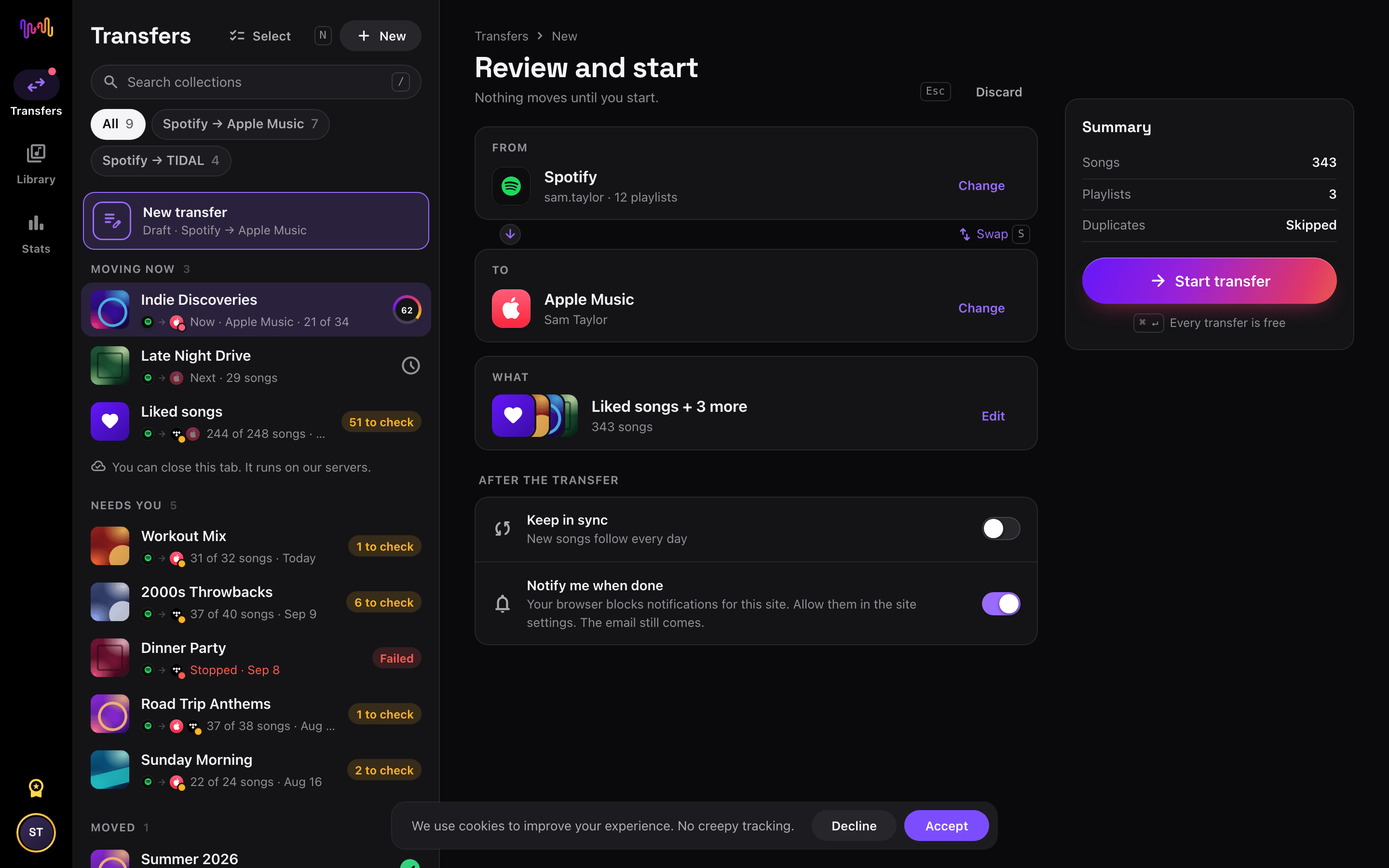
Connect Spotify as the source
Open Free Your Music, tap the Spotify tile on the "Select source" screen and sign in on the Spotify sign-in page. Free Your Music does not store your Spotify password.
- 2
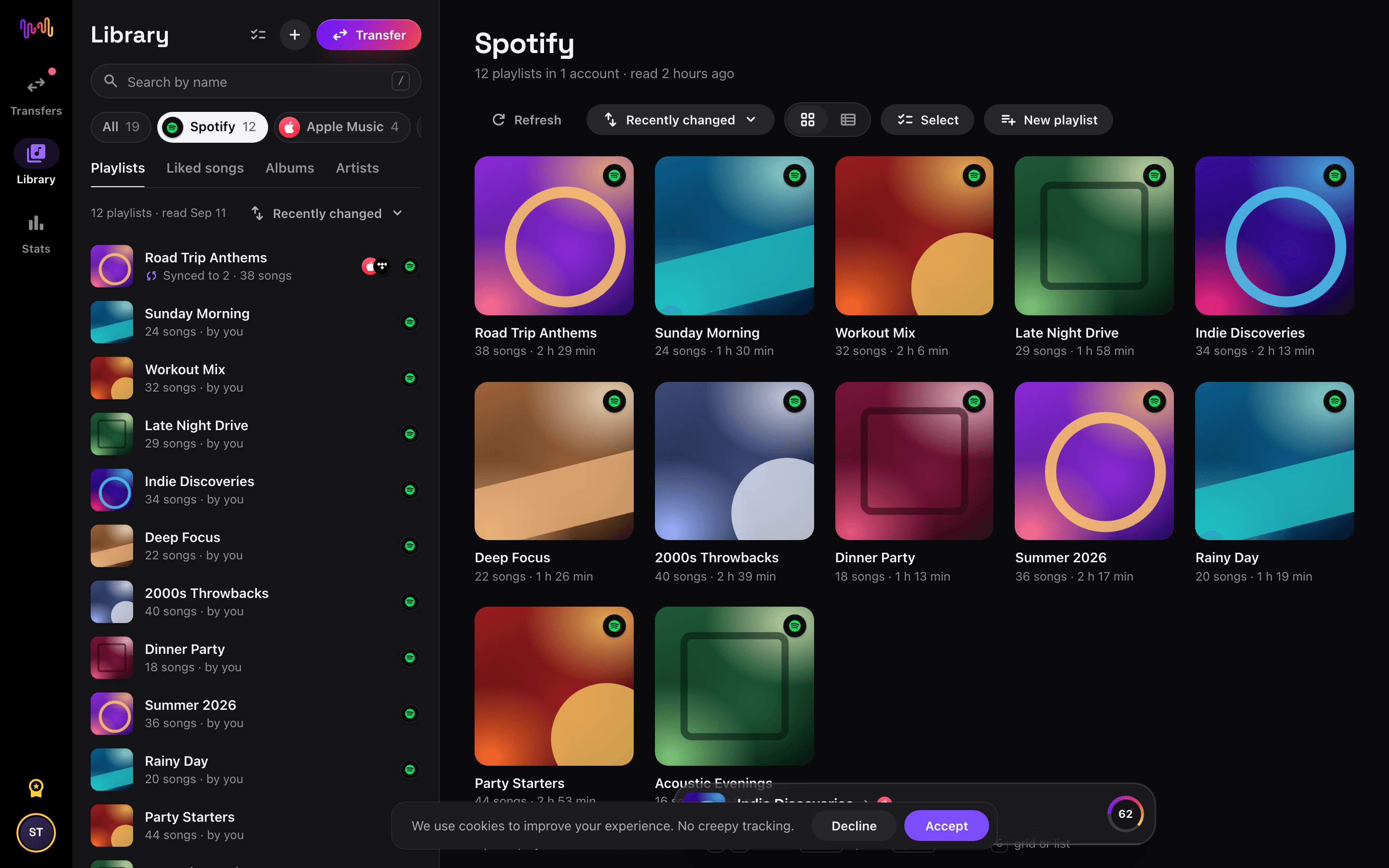
Choose Apple Music as the destination
On the "Select destination" screen, tap Apple Music and sign in. Free Your Music needs access to your Apple Music library to create the playlists there.
- 3
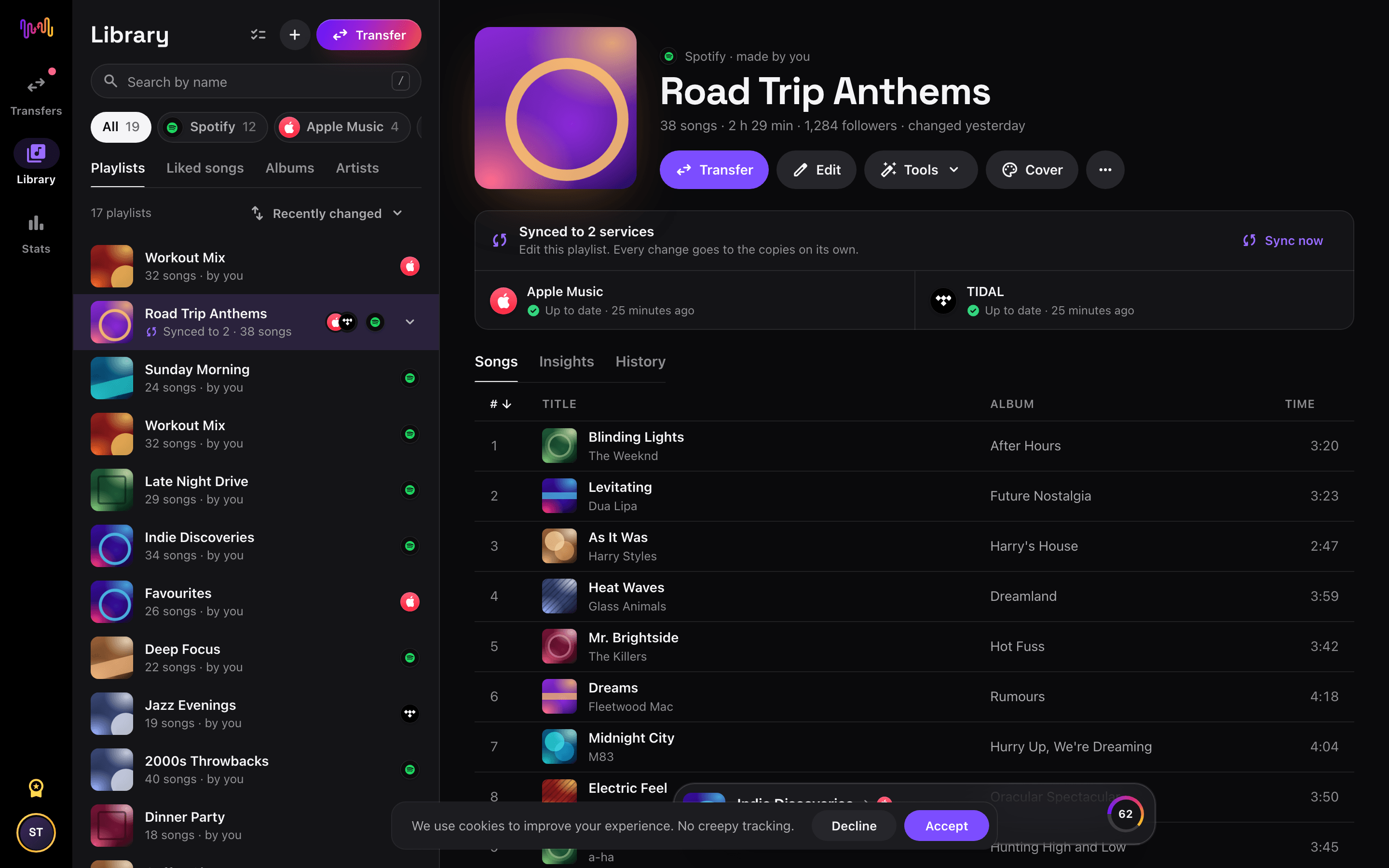
Select what to move
Tick the playlists you want on Apple Music. Use the filters and the search field to find them, or select everything to move your whole Spotify library at once.
- 4
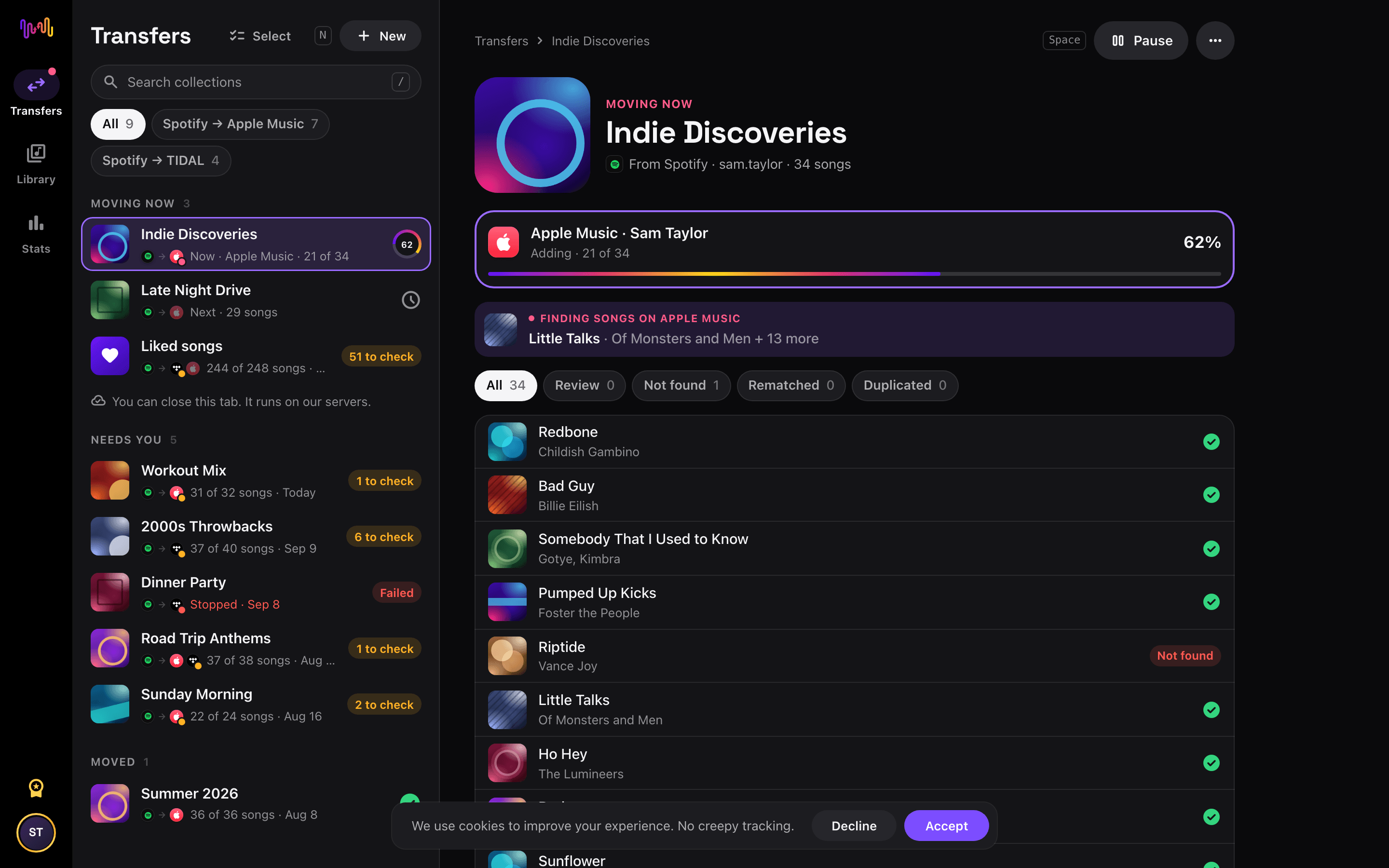
Start the transfer and check the results
Tap "Begin transfer". Free Your Music matches every song on Apple Music, keeps the playlist names and the song order, and shows a confidence score for each match. Use Rematch to fix any song it could not find.


Spotify to Apple Music with Siri Shortcuts
Move a Spotify playlist to Apple Music from its link. You build no new playlist by hand.
- In Spotify, tap Share on a playlist, then Copy link.
- Run the Transfer a link shortcut of Free Your Music and pick Apple Music.
- The whole playlist moves to Apple Music. We tell you when it is done.
Watch your Spotify to Apple Music transfer from your Home Screen
Start the transfer, close the app and follow it on your Home Screen or Lock Screen. The transfer widgets are free.
- Moving now shows how many songs are on Apple Music already.
- Last transfer takes you to the songs to check, in one tap.
This transfer is free
Every transfer from Spotify to Apple Music is free in your browser and in the new iPhone and Android apps. No song limit, no card.
Keep them in sync
Still use both? Turn on auto-sync. New songs on Spotify reach Apple Music once a day.
Apple Music playlist tools
Spotify playlist tools
Good to know before you move Spotify to Apple Music
Spotify as the source
A free Spotify account is enough. Spotify does not let apps read the playlists it makes for you, such as personalised mixes: copy their songs into your own playlist first.
Read the Spotify guide →Apple Music as the destination
Apple Music needs an active subscription to add music. Apple does not let apps remove or reorder songs in a playlist, so sync only adds new songs there.
Read the Apple Music guide →Apple Music has a built-in import. Here is how Free Your Music is different.
Apple Music can import playlists from Spotify in Settings → Apps → Music → Transfer Music from Other Music Services, or at music.apple.com. It is a one-time import into Apple Music, and Apple does not offer it in every country.
| Built-in Apple Music import | Free Your Music | |
|---|---|---|
| Where your music can go | Apple Music only | Apple Music and 11 other services |
| Move between two Apple Music accounts | No | Yes |
| Keep playlists in sync after the move | No, one-time import | Yes, with Auto-Sync (Pro) |
| Back up your library | No | Yes, with File Backup (CSV) in Pro |
| Move away from Apple Music later | No | Yes, in any direction |
For a quick one-time move, the built-in import can be enough. Use Free Your Music to keep services in sync, move between accounts, back up your library, or leave Apple Music later.
What transfers from Spotify to Apple Music
On every device
Move, convert or import: one transfer from Spotify to Apple Music
Whatever you call it, it is the same job. You can move your Spotify playlists to Apple Music, convert a Spotify playlist into a Apple Music playlist, or import your Spotify library into Apple Music. Free Your Music does all three in one transfer, for one playlist or for a library of thousands of songs.
Keep Spotify and Apple Music in sync
Still adding songs on Spotify? With Pro, Auto-Sync checks your transferred playlists and adds new songs to Apple Music automatically, so both libraries stay the same. Pricing →
Move Spotify to another service


Transfer to Apple Music from another service
Moving from Spotify to Apple Music, explained
Switching from Spotify to Apple Music used to mean rebuilding years of playlists by hand, one song at a time. It does not anymore. Free Your Music reads your Spotify library through Spotify’s own official sign-in and recreates it inside Apple Music — your playlists, your liked songs and your saved albums — usually in a single sitting. You keep the collection you spent years curating; only the app around it changes.
This page walks through exactly what a Spotify to Apple Music transfer moves, how the track matching works, how long it takes, and the handful of things worth knowing before you start. If you just want to get going, download Free Your Music, connect both accounts, pick what to move and hit transfer — the rest of this guide is here for when you want the detail.
What transfers to Apple Music, and what does not
The three things most people care about all move: your playlists (with their original names and song order kept intact), your liked or saved songs, and your saved albums. Followed artists do not transfer to Apple Music. You can move everything in one pass or pick individual playlists — track counts are shown before you commit, so there are no surprises.
A few things cannot cross over, and it is better to know up front. Spotify-generated playlists such as Discover Weekly and Release Radar are algorithmic and unique to Spotify, so they transfer as a snapshot of their current tracks rather than as living playlists. Podcasts do not move — Apple hosts podcasts in a separate app — and locally uploaded files that only exist on your device are not part of your streaming library. Everything that is a real catalogue track, though, is fair game.
How Free Your Music matches your tracks
Behind every clean transfer is track matching. Free Your Music identifies each Spotify song and finds the same recording in Apple Music’s catalogue, preferring the industry-standard ISRC code where it is available and falling back to title, artist, album and duration when it is not. That combination is what lets a 1,000-track library land on the other side with names and order preserved.
No two catalogues are identical, so a small number of tracks — regional exclusives, a remaster that only one service carries, a remix with different metadata — may not have a perfect counterpart. Free Your Music never silently drops these. Anything imperfect is flagged for one-tap Rematch with suggested alternatives, so you decide what to do instead of discovering a gap weeks later.
How long does a Spotify to Apple Music transfer take?
Most transfers finish in minutes. Once both accounts are connected, a library of around 1,000 tracks typically completes in under ten minutes. Very large libraries — tens of thousands of songs across dozens of playlists — can take longer, but you can start it and walk away; the transfer runs on its own and you can pick up on another device if you like.
Because Free Your Music has apps for iPhone, iPad and Android and a web app for every computer, you are not tied to one machine. Start the Spotify to Apple Music move on your laptop and check the progress on your phone — it is the same account and the same transfer.
Spotify vs Apple Music: what actually changes
Your music comes with you, but the experience around it shifts. Apple Music includes lossless and hi-res lossless audio, plus Spatial Audio with Dolby Atmos, at no extra cost — a genuine upgrade if you have been on Spotify’s compressed tiers. Catalogues are broadly comparable in size, though specific live sets, regional releases or indie uploads can differ between the two.
Day to day, you trade Spotify’s cross-device Connect and its collaborative-playlist culture for Apple Music’s tight integration with the Apple ecosystem — Siri, the Home app, and seamless handoff between iPhone, Mac and HomePod. Family plans on both services cost about the same, so the decision usually comes down to audio quality, devices you already own, and which recommendations you prefer.
Do you need to keep Spotify while you transfer?
Yes — keep your Spotify subscription active until the transfer is done and you have checked the result. Free Your Music needs to read your Spotify library while it copies to Apple Music, and keeping both live means you never lose access to your collection mid-move. Cancel Spotify only once you are happy everything landed.
Worth noting: Apple Music does not have a permanent free tier the way Spotify does, so you will need an Apple Music trial or subscription on the destination side to receive the transfer. Your password is never shared with Free Your Music in either direction — each service is connected through its own official login screen.
Tips for a clean migration
Start with a quick tidy: delete the dead Spotify playlists you will never miss so you are not carrying clutter across. Transfer your most important playlists first and spot-check a couple of them in Apple Music before moving the rest — it builds confidence in the match quality. When the transfer finishes, open the Rematch list and resolve any flagged tracks while the context is fresh.
If you share playlists with friends, remember that collaborative editing does not carry between services; the songs move, but the collaboration is a Spotify feature. And once your library is on Apple Music, take a minute to re-download your offline playlists on mobile so your commute is covered from day one.
Keeping Spotify and Apple Music in sync afterwards
A one-time move is not the only option. If you are not ready to fully commit — or you share a household that uses both services — Free Your Music’s Auto-Sync keeps two libraries mirrored, pushing new additions across once a day so a song you save on Spotify shows up on Apple Music without you thinking about it.
And if you ever want to reverse course, the transfer runs just as happily the other way, from Apple Music back to Spotify. Your library is yours; Free Your Music simply makes it portable. Download the app, connect Spotify and Apple Music, and see how much of your collection comes across — every transfer is free, with no song limit.
Frequently asked questions
How do I transfer my Spotify playlist to Apple Music?
To transfer Spotify to Apple Music, install Free Your Music, select Spotify as the source and Apple Music as the destination, choose the playlists you want, and start the transfer. The app finds each song on Apple Music and lists any track it could not match.
What exactly transfers from Spotify to Apple Music?
Free Your Music moves your playlists, liked songs, and saved albums from Spotify to Apple Music. It matches the songs one by one and lists anything that is not on Apple Music, so you can fix it before you switch.
Apple Music has its own import tool. Why use Free Your Music?
The built-in tool imports music into Apple Music once. Free Your Music moves music between 12 services in any direction, moves music between two accounts of the same service, keeps playlists in sync after the move and backs up your library.
I do not see Transfer Music in Apple Music. What can I do?
Apple does not offer the transfer tool in every country. Free Your Music moves your Spotify playlists to Apple Music on iPhone, iPad, Android, Mac, Windows and Linux.
Can I transfer Spotify playlists to Apple Music for free?
Yes. Every transfer from Spotify to Apple Music is free: your playlists, liked songs, and saved albums, with no song limit and no card. Rematch and 30 days of Stats are free too. Pro keeps Spotify and Apple Music in sync every day and adds the playlist tools and playlist insights.
What happens to songs that are not on Apple Music?
Catalogs differ between services and regions. Free Your Music lists every song it could not match on Apple Music, so you can pick another version with Rematch or skip it. Nothing is dropped without you seeing it.
Will my Spotify playlists be deleted?
No. Free Your Music copies your music to Apple Music and leaves your Spotify library as it is. You decide later whether to keep or cancel your Spotify account.
How long does a Spotify to Apple Music transfer take?
Most playlists move in a few minutes. Large libraries take longer, because the time depends on the number of songs and on the limits of Spotify and Apple Music. You can keep using your device while the transfer runs.
Can I transfer Spotify to Apple Music on my phone?
Yes. Free Your Music runs on iPhone, iPad and Android, and in the browser on any Mac, Windows or Linux computer. The steps are the same on every device.
Is there a Spotify to Apple Music shortcut?
Yes. On iPhone, copy a Spotify playlist link and run the free Transfer a link shortcut of Free Your Music. It moves the playlist to Apple Music. You can also ask Siri to do it for you.
Can I follow my Spotify to Apple Music transfer on my Home Screen?
Yes. Add the free Free Your Music Moving now widget. It shows how many songs are on Apple Music already, and the free Last transfer widget takes you to the songs to check when it is done. The widgets work on iPhone and Android.
Find new music for your new library
Deep cuts every Thursday, free. SongsBrew is our weekly music letter: one subject in depth and a playlist at the bottom. 25,000+ readers.
Ready to move to Apple Music?
Open Free Your Music on the web or on your phone and move your whole library in minutes. Every transfer is free. No card.
Move my music free →