How to synchronize music playlists across platforms
March 20, 2026
Managing music playlists across multiple streaming services can feel like juggling puzzle pieces that never quite fit together. You've carefully curated the perfect collection on Spotify, but switching to Apple Music means starting from scratch. Or maybe you want your favorite tracks accessible on both platforms without manually rebuilding everything. This guide walks you through practical methods to synchronize and transfer your playlists seamlessly in 2026, using both manual techniques and automated tools that save hours of repetitive work.
Table of Contents
- What You Need: Tools And Prerequisites For Synchronizing Playlists
- Step-By-Step Guide To Synchronizing Music Playlists Across Platforms
- Troubleshooting And Common Pitfalls When Synchronizing Playlists
- Expected Results And Maintaining Playlist Synchronization Long-Term
- Explore Playlist Transfer Solutions With Free Your Music
Key takeaways
| Point | Details |
|---|---|
| Native sync limitations | Most streaming services don't offer built-in playlist synchronization between competing platforms. |
| Preparation essentials | Identify your source and target platforms, then back up existing playlists before starting any transfer. |
| Transfer method options | Choose between manual export/import workflows or automated synchronization tools based on your needs. |
| Common troubleshooting | Address issues like missing songs, duplicates, and format errors with systematic verification steps. |
| Specialized software benefits | Dedicated playlist transfer applications dramatically reduce manual effort and maintain accuracy across platforms. |
What you need: tools and prerequisites for synchronizing playlists
Before diving into playlist synchronization, gather the right tools and understand which platforms you're working with. The major streaming services each handle playlists differently, creating compatibility challenges that require specific approaches.
Popular platforms include Spotify, Apple Music, YouTube Music, Amazon Music, Tidal, Pandora, SoundCloud, Deezer, and Audiomack. Each service stores playlist data in proprietary formats, though some allow exports to universal file types. Understanding these differences helps you choose the most effective transfer method.
Playlist file formats vary widely. CSV (comma-separated values) files work well for basic song lists containing track names and artists. XLSX spreadsheet formats offer more structured data storage with columns for metadata like album names, release years, and duration. Some platforms use JSON or XML for technical exports, while others only support proprietary formats readable by their own applications.
Several tools facilitate playlist backup and cross-platform transfers. Browser extensions can export playlists directly from web players. Desktop applications offer more robust features like batch processing and automatic matching. Cloud-based services handle the heavy lifting on remote servers, requiring only login credentials. When selecting tools, verify they support both your source and target platforms.
Pro Tip: Always create a complete backup of your playlists before attempting any synchronization. Export to a file format like XLSX or CSV and store it locally. This safety net lets you recover everything if transfers go wrong or songs disappear during the process.
Here's how different platforms handle common export and import formats:
| Platform | CSV Export | XLSX Export | JSON Export | Native Import |
|---|---|---|---|---|
| Spotify | Third-party tools | Third-party tools | API access | Limited |
| Apple Music | Third-party tools | Third-party tools | No | Limited |
| YouTube Music | Third-party tools | Third-party tools | No | Limited |
| Pandora | No | No | No | Limited |
| SoundCloud | Third-party tools | Third-party tools | API access | No |
Most streaming services deliberately restrict direct playlist exports to keep users within their ecosystem. This makes third-party synchronization tools essential for anyone managing music libraries across multiple platforms. You can export Spotify playlists using specialized software that bypasses these limitations.
Account access requirements also matter. You'll need active subscriptions or free accounts on both source and target platforms. Some services limit playlist imports to premium subscribers, while others allow free users to transfer smaller collections. Check these restrictions before starting to avoid mid-process surprises.
Step-by-step guide to synchronizing music playlists across platforms
Synchronizing playlists requires methodical execution whether you choose manual or automated approaches. Each method offers distinct advantages depending on your technical comfort level and how frequently you need synchronization.
Manual transfer involves exporting playlist data from your source platform, then importing it into your target service. Start by logging into your source platform's web interface or application. Navigate to the playlist you want to transfer and look for export options. If native export isn't available, use a third-party tool that can extract playlist data into a CSV or XLSX file. Download this file to your computer, then log into your target platform. Look for import or upload features, usually found in settings or library management sections. Upload your exported file and let the platform process the song list. The service will attempt to match each track in its catalog, adding found songs to a new playlist.

Automatic transfer through specialized software streamlines this entire workflow. These applications handle authentication, data extraction, song matching, and playlist creation without manual file management. You simply connect both accounts, select playlists to transfer, and let the software work.
Here are the exact steps for common platform transfers:
- Install a playlist transfer application or access a web-based transfer service
- Authenticate both your source platform account (like Spotify) and target platform account (like Apple Music)
- Select the specific playlists you want to synchronize from a list of all available playlists
- Configure transfer settings such as handling duplicates, creating new playlists versus updating existing ones, and matching preferences
- Initiate the transfer process and monitor progress through the application interface
- Review the completed transfer for any missing tracks or errors that need manual correction
- Verify playlist order and metadata accuracy on your target platform
For Spotify to Apple Music transfers, the process typically completes within minutes for playlists under 100 songs. Larger collections may take longer as the software matches thousands of tracks between different catalogs. You can convert Apple playlists to Spotify using the same principles in reverse.
Common scenarios include moving your entire library when switching primary services, maintaining identical playlists on multiple platforms for different devices, or sharing curated collections with friends who use different streaming apps. Each scenario benefits from understanding both manual and automatic options.
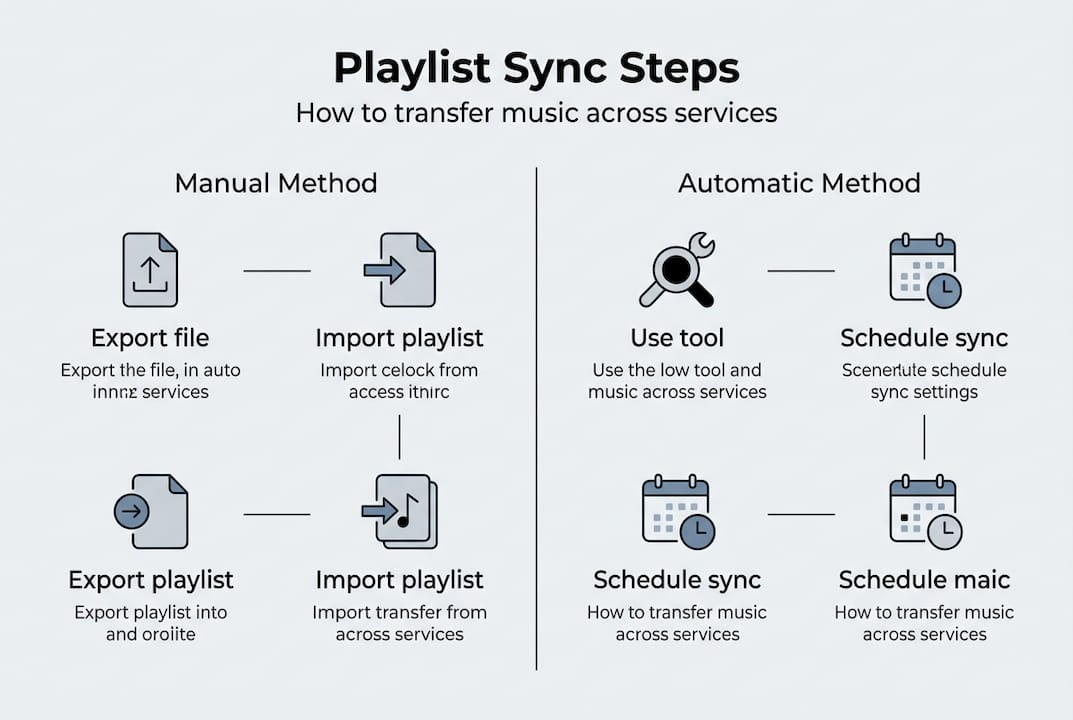
Pro Tip: Schedule regular synchronization sessions rather than waiting for major library changes. Weekly or monthly syncs keep all platforms current with minimal effort, preventing the overwhelming task of transferring hundreds of new additions at once.
The transfer from Spotify to Apple Music demonstrates how automated tools handle authentication, matching, and playlist creation in a single workflow. This eliminates the tedious manual steps that consume hours for large music libraries.
Troubleshooting and common pitfalls when synchronizing playlists
Even with careful preparation, playlist synchronization can encounter obstacles. Recognizing common issues and knowing how to resolve them ensures successful transfers without losing precious music collections.
Incomplete transfers happen when songs exist on your source platform but aren't available in your target platform's catalog. Regional licensing restrictions, artist distribution choices, and catalog gaps create these mismatches. When transfers complete with missing tracks, check if those songs are simply unavailable or if matching errors occurred.
Duplicate songs appear when synchronization tools can't distinguish between identical tracks or when you run multiple transfers without clearing previous attempts. Some platforms also treat different versions of the same song (like remastered editions or live recordings) as separate entries, leading to unwanted duplicates.
Format errors occur when exported playlist files contain incompatible characters, incorrect encoding, or structural problems. CSV files with improperly escaped commas or quotation marks cause import failures. XLSX files with extra columns or missing headers confuse platform import systems.
Follow these troubleshooting steps when problems arise:
- Verify your exported file opens correctly in a spreadsheet application before importing
- Check that song titles and artist names match exactly between platforms, including spelling and special characters
- Confirm your target platform account has necessary permissions for playlist creation and modification
- Test with a small sample playlist first to identify issues before transferring your entire library
- Review platform-specific restrictions on playlist size, song count, or import frequency
- Clear browser cache or application data if transfers repeatedly fail at the same point
Understanding how platform differences affect synchronization success is crucial. Each streaming service uses unique metadata standards, song identifiers, and catalog organization systems. What Spotify calls an "album" might have a different name in Apple Music's database, causing matching algorithms to fail even when the same recording exists on both platforms.
Avoid common mistakes by never overwriting your original playlists until you've verified the transfer completed successfully. Create new playlists on your target platform first, then compare them carefully against your source. Only delete originals after confirming everything transferred correctly.
Format compatibility issues often stem from trying to import files created for one platform directly into another without proper conversion. Sync errors frequently occur when metadata doesn't align between services or when song availability differs regionally. Using an automatic playlist transfer guide helps navigate these technical challenges with built-in error handling.
Account permission problems prevent transfers when you're logged into the wrong profile or haven't granted necessary access rights to transfer applications. Double-check that you've authorized the correct accounts and that any two-factor authentication requirements are satisfied before starting transfers.
Expected results and maintaining playlist synchronization long-term
Successful playlist synchronization delivers your complete music collection across all chosen platforms with minimal song loss. Understanding realistic expectations helps you evaluate results and plan ongoing maintenance strategies.
Typical outcomes show 85-95% song matching rates for popular music on major platforms. Obscure tracks, independent releases, regional exclusives, and very new songs may not transfer successfully. Your synchronized playlists should maintain original song order, though some platforms automatically sort by different criteria. Playlist names, descriptions, and cover images usually transfer, but formatting might change based on target platform limitations.
Limitations include delayed updates when you add songs to one platform but automatic synchronization doesn't immediately reflect changes elsewhere. Some services throttle API access, slowing down transfers for very large libraries. Platform policy changes can break existing synchronization tools, requiring updates or alternative solutions.
Maintaining synchronized playlists long-term requires consistent habits:
- Schedule weekly or monthly synchronization sessions to catch new additions and deletions
- Keep backup copies of all playlists in neutral formats like XLSX files
- Monitor streaming service announcements for catalog changes that might affect your library
- Test synchronization tools after platform updates to ensure continued compatibility
- Document which playlists are synchronized where to avoid confusion
- Review synchronized playlists quarterly to remove duplicates and fix matching errors
Manual versus automatic synchronization maintenance offers different trade-offs:
| Aspect | Manual Sync | Automatic Sync |
|---|---|---|
| Time investment | High, requires regular attention | Low, runs on schedules |
| Accuracy control | Complete user oversight | Algorithm-dependent matching |
| Cost | Free using native tools | Often requires paid subscriptions |
| Flexibility | Handles edge cases well | May struggle with unusual tracks |
| Scalability | Difficult for large libraries | Easily handles thousands of songs |
Automatic synchronization tools excel at maintaining consistency with minimal user effort, making them ideal for people who frequently update playlists or manage extensive collections. They run scheduled syncs in the background, ensuring your platforms stay aligned without manual intervention.
For users who prefer control over every aspect of their music library, manual synchronization provides transparency and precision. You can review each change, handle special cases individually, and avoid automated decisions that might not match your preferences.
Hybrid approaches combine both methods. Use automatic tools for your main playlists that change frequently, while manually managing specialized collections that need careful curation. This balances convenience with control.
As your music library grows, transferring from Spotify to Apple Music or between any platforms becomes more complex. Establishing maintenance routines early prevents overwhelming synchronization tasks later. Regular small updates are far easier than infrequent massive transfers.
Platform evolution also affects long-term synchronization. Streaming services regularly update their APIs, change catalog availability, and modify playlist features. Staying informed about these changes helps you adapt your synchronization strategy before problems arise.
Explore playlist transfer solutions with Free Your Music
Managing playlist synchronization manually takes significant time and technical knowledge. Free Your Music simplifies the entire process with specialized tools designed specifically for cross-platform music transfers.
Our platform supports transfers between dozens of streaming services, including popular options and niche platforms. Whether you're moving from Audiomack to file backup, file backup to Zvuk, or file backup to Pandora, our automated system handles the technical complexity. You focus on enjoying your music while we ensure your playlists stay synchronized across every platform you use. Our tools preserve playlist structure, match songs accurately, and provide detailed reports showing exactly what transferred successfully.
How do I keep my playlists updated across all streaming platforms?
How do I keep my playlists updated across all streaming platforms?
Schedule regular synchronization sessions using automatic tools that run on set intervals. Many automatic playlist transfer services offer scheduled syncing that checks for changes daily or weekly. Always maintain backup copies of your playlists in neutral file formats before running updates, so you can restore previous versions if synchronization errors occur.
What are the best tools to transfer playlists between Spotify and Apple Music?
Free Your Music provides dedicated tools specifically optimized for Spotify and Apple Music transfers. Our guides for exporting Spotify playlists to Apple Music walk through the entire process with screenshots and troubleshooting tips. Automated options handle authentication, song matching, and playlist creation without manual file management, saving hours compared to manual methods.
Are there limitations when synchronizing playlists across different music services?
Yes, song availability varies significantly between platforms due to licensing agreements and regional restrictions. Catalog differences between services mean some tracks won't transfer successfully. Metadata format variations can also cause matching errors when song titles, artist names, or album information don't align perfectly between platforms. Expect 85-95% matching rates for popular music, with lower rates for obscure or independent releases.
Can I synchronize playlists automatically without manual intervention?
Automated synchronization tools run scheduled transfers that keep playlists aligned across platforms without your active involvement. These services monitor your source playlists for changes, then update target platforms accordingly. While automation handles most scenarios well, occasional manual review ensures accuracy, especially for newly added songs or tracks with matching ambiguities. Set up automated syncs for frequently updated playlists while manually managing specialized collections that need careful curation.
Recommended


Migrate from and to any music services


Most popular Apple Music transfers: