Master music streaming user onboarding: seamless transfers
May 18, 2026

Switching music streaming platforms should be exciting, but it often becomes frustrating when playlists vanish or song details scramble during migration. You've spent years curating the perfect collections, only to face incomplete transfers and metadata chaos. This guide walks you through proven methods to preserve your playlists, maintain accurate metadata, and ensure smooth onboarding across any music streaming service without losing your carefully organized music library.
Table of Contents
- Understanding The Onboarding Challenge: Playlist And Metadata Preservation
- Preparing For Playlist Migration: Tools, Data, And Requirements
- Executing The Transfer: Step By Step Playlist Migration Process
- Verifying And Managing Playlists Post Migration
- Simplify Your Music Streaming Onboarding With Free Your Music
- FAQ
Key takeaways
| Point | Details |
|---|---|
| Playlist preservation drives satisfaction | Music playlist preservation directly impacts user satisfaction and engagement across digital platforms. |
| Metadata issues are common | Switching services often causes altered or lost track details due to inconsistencies. |
| Preparation simplifies migration | Understanding transfer limitations and choosing proper tools reduces common playlist transfer challenges. |
| Verification ensures accuracy | Checking completeness and metadata after transfer maintains playlist management quality. |
Understanding the onboarding challenge: playlist and metadata preservation
When you switch music streaming platforms, you expect your playlists to follow seamlessly. Reality often disappoints. Music playlist preservation directly impacts user satisfaction and engagement across digital platforms, making it a critical factor during onboarding.
The core problem lies in how different services structure and store music data. Each platform maintains its own catalog with unique identifiers, artist naming conventions, and album information. When you migrate, these differences create friction. Metadata inconsistencies are common when switching music services, often resulting in altered or lost track details.
You'll encounter several specific issues during migration. Missing songs top the list, as not every track exists across all platforms due to licensing restrictions. Album artwork might disappear or display incorrectly. Artist names sometimes change between services, causing confusion in your library. Playlist ordering can shuffle, destroying the careful sequencing you created.
Understanding music playlist structure helps set realistic expectations. Basic elements like song titles and artist names usually transfer, but nuanced details suffer. Play counts reset to zero. Custom descriptions vanish. Collaborative playlist permissions don't carry over. Release date information might mismatch between catalogs.
"The challenge isn't just moving songs from point A to point B. It's preserving the context, organization, and metadata that make your playlists meaningful."
These playlist transfer challenges vary by service pair. Spotify to Apple Music transfers differ from YouTube Music to Tidal migrations. Each combination presents unique obstacles based on catalog overlap, API capabilities, and metadata standards.
Preparing mentally for imperfection helps. No transfer will be 100% perfect, but understanding potential issues lets you plan verification steps and manual corrections. You'll save time by knowing which elements require attention after migration rather than expecting flawless automation.
Preparing for playlist migration: tools, data, and requirements
Successful playlist migration starts long before you click any transfer button. Proper preparation minimizes headaches and maximizes metadata retention throughout the process.

First, identify your source and destination services clearly. Document which playlists matter most, noting any that contain rare tracks or complex metadata. This prioritization helps you focus verification efforts later. Gather login credentials for both platforms, ensuring you have active subscriptions if required for full library access.
Backup becomes essential before any migration. Export your playlists locally using native platform features or third party tools. This safety net lets you recover if something goes wrong. Store these backups in multiple locations, including cloud storage and local drives.
Pro Tip: Create a spreadsheet listing your most important playlists with track counts and creation dates before migration. This baseline makes post transfer verification much faster.
Understanding music playlist data structures reveals what transfers easily versus what requires manual attention. Basic fields like track title, artist, and album typically migrate smoothly. Advanced metadata such as explicit content flags, release years, and genre tags prove more fragile.
Spotify consolidated 14 endpoints into generic library endpoints, reducing complexity significantly, which affects how playlist data is accessed and transferred. This API change in 2026 impacts how modern tools interact with Spotify playlists, potentially improving transfer reliability for users migrating to or from the platform.
Choosing the right migration tool matters enormously. Evaluate options based on these criteria:
- Service compatibility with your specific source and destination platforms
- Metadata preservation capabilities beyond basic track information
- Batch processing features for handling multiple playlists simultaneously
- Error reporting to identify problematic tracks requiring manual attention
- Cost structure matching your migration volume and frequency needs
Compare tool capabilities using this framework:
| Feature | Why It Matters | Questions to Ask |
|---|---|---|
| Metadata fields supported | Determines information preservation | Does it transfer play counts, dates added, custom descriptions? |
| Matching algorithm | Affects accuracy of song identification | How does it handle remixes, live versions, and regional variants? |
| Playlist structure retention | Maintains organization | Does it preserve folder hierarchies and collaborative settings? |
| Error handling | Enables troubleshooting | Does it provide detailed logs of failed transfers? |
Following playlist transfer best practices during preparation sets you up for smoother execution. Test with small, less critical playlists first. This trial run reveals tool quirks and service limitations without risking your most valuable collections.
Document any platform specific limitations beforehand. Some services restrict playlist sizes, impose transfer rate limits, or don't support certain metadata fields. Knowing these constraints helps you adjust expectations and plan workarounds.
Executing the transfer: step by step playlist migration process
With preparation complete, you're ready to execute the actual migration. Following a structured process minimizes errors and preserves maximum metadata.
-
Export playlists from your original music streaming service using built in features or your chosen migration tool. Most platforms offer native export options through settings menus, though formats and completeness vary. Verify exports contain all expected tracks by checking file sizes and opening sample playlists.
-
Choose a playlist migration tool that supports both your source and target services. Authenticate both accounts within the tool, granting necessary permissions for reading source playlists and writing to the destination. Review permission scopes carefully to ensure you're comfortable with access levels.
-
Import playlists into the new service through your migration tool. Start with smaller playlists to test the process and identify potential issues before committing your entire library. Monitor transfer progress closely, noting any error messages or warnings about unavailable tracks.
-
Use collaborative filtering features if available to refine and extend playlists. Collaborative filtering models help extract patterns from existing playlists to recommend appropriate song transfers and extensions. This technology identifies similar tracks when exact matches aren't available, filling gaps intelligently rather than leaving holes in your playlists.
-
Review and manually adjust any missing or inaccurate metadata immediately after transfer. Check song titles for truncation or character encoding issues. Verify artist names match your expectations, as variations like "The Beatles" versus "Beatles" can fragment your library. Confirm album assignments, especially for compilation albums where track attribution often confuses migration tools.
Pro Tip: Transfer smaller playlists first to test the process and troubleshoot issues before committing your entire library. This approach lets you refine your technique and adjust tool settings for optimal results.
Comparing popular transfer tools helps you select the best option for your specific migration:
| Tool Type | Metadata Support | Service Coverage | Best For |
|---|---|---|---|
| Native platform exports | Basic fields only | Single service | Simple backups |
| Dedicated migration services | Comprehensive | 10 to 15 major platforms | Complex transfers |
| Open source solutions | Variable by implementation | Depends on community | Technical users |
| Manual CSV methods | Full control but labor intensive | Universal | Small libraries |
Understanding the music library transfer process helps you anticipate timing and resource requirements. Large libraries with thousands of tracks may take hours to process. Network speed, API rate limits, and server load all influence transfer duration.
Playlist transfer tools often support basic structure transfer but may struggle with complex metadata. Expect to invest time in post transfer cleanup regardless of tool quality. No automated solution achieves perfection due to fundamental differences in how services catalog and organize music.
Monitor your destination service during transfer to catch issues early. Some platforms display transfer progress in real time, letting you pause if problems emerge. Others process transfers in background queues, requiring patience and periodic checking.
Document any recurring problems you notice during execution. If specific artists or albums consistently fail to transfer correctly, you can address these systematically during verification rather than discovering them randomly later.
Verifying and managing playlists post migration
Transfer completion marks the beginning of verification, not the end of your migration journey. Thorough checking ensures your playlists function correctly and contain accurate metadata on the new platform.
Start with a systematic completeness check. Compare playlist track counts between source and destination services. Discrepancies signal missing songs requiring investigation. Open each playlist and scan for obvious gaps, paying special attention to albums where sequential tracks should appear together.
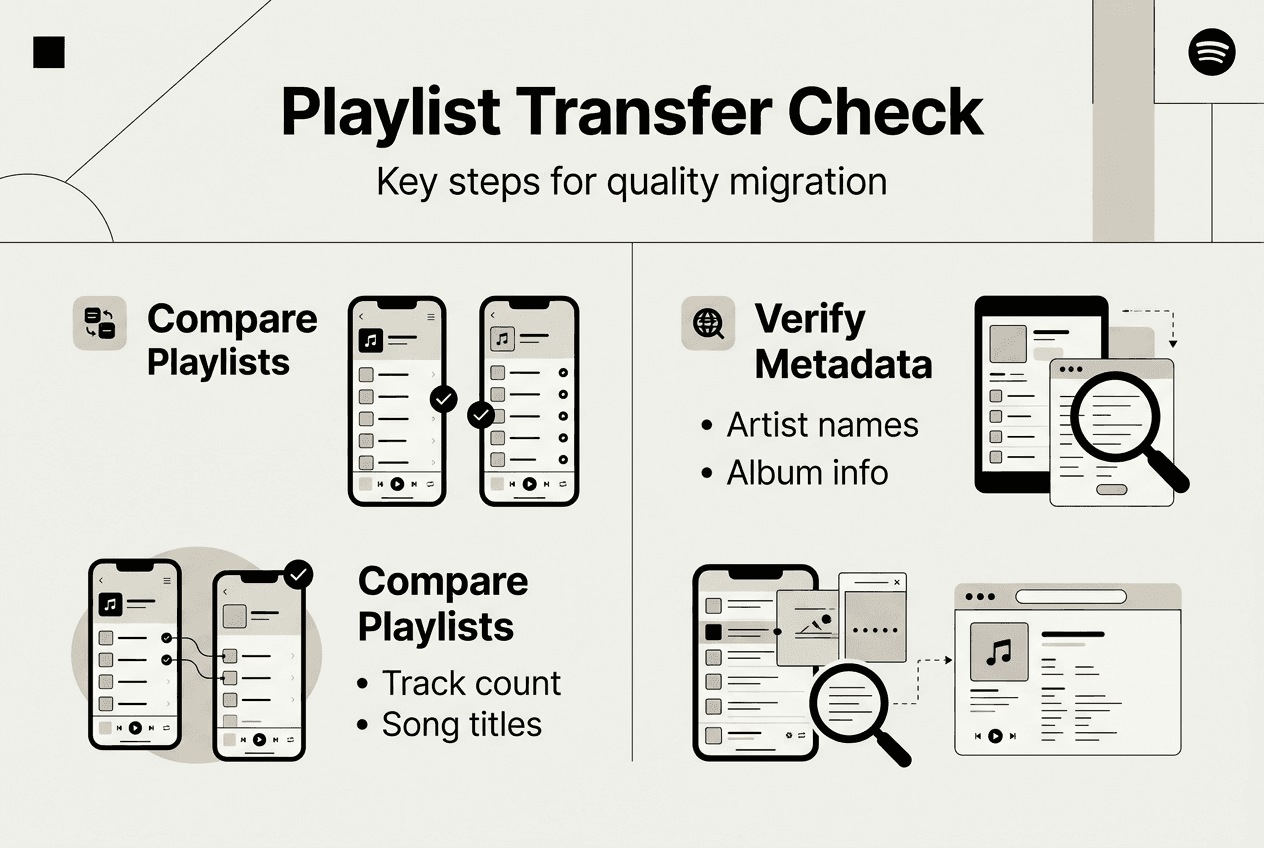
Metadata accuracy deserves careful scrutiny. Music playlist preservation directly impacts satisfaction and engagement, making verification worth the time investment. Play random tracks from various playlists to confirm they match expectations. Incorrect matches become obvious immediately when a rock song plays instead of expected classical music.
Use this verification checklist to ensure nothing slips through:
| Verification Step | What to Check | Action if Issues Found |
|---|---|---|
| Track count accuracy | Total tracks match source playlist | Identify and manually add missing songs |
| Metadata correctness | Artist names, albums, titles display properly | Update incorrect entries through platform tools |
| Playback functionality | Songs play without errors | Report broken tracks to service support |
| Playlist organization | Folders and ordering preserved | Recreate structure manually if needed |
| Collaborative settings | Shared playlists maintain permissions | Reinvite collaborators and restore access |
Organize playlists for easy access and future updates immediately after verification. Create folder structures matching your listening habits. Group playlists by mood, genre, activity, or any system that makes sense for your usage patterns. Consistent organization prevents future chaos as your library grows.
Implement playlist management tips to maintain quality over time. Regular maintenance keeps playlists fresh and relevant. Remove duplicate tracks that sometimes appear during migration. Update outdated songs with remastered versions when available. Add new releases to existing themed playlists to keep them current.
Pro Tip: Regularly back up playlists to avoid future data loss. Schedule monthly exports of your most important collections, storing them in multiple locations for redundancy.
Track engagement with your migrated playlists to identify problems. If you stop listening to previously favorite playlists, investigate why. Missing key tracks or metadata errors might be reducing enjoyment without you consciously recognizing the cause.
Understanding what is playlist management helps you develop sustainable habits for long term library health. Management encompasses curation, organization, backup, and continuous improvement. Treating your music library as a living collection rather than a static archive ensures it remains valuable.
Document your verification findings for future reference. Note which types of tracks transferred poorly, which metadata fields proved problematic, and which playlists required the most manual correction. This knowledge becomes invaluable if you migrate again or help others through similar processes.
Set calendar reminders for periodic playlist audits. Monthly or quarterly reviews catch degradation early, before too many issues accumulate. Check for broken tracks that services sometimes remove due to licensing changes. Update metadata that drifted from your standards. Refresh playlist descriptions and artwork to maintain visual appeal.
Simplify your music streaming onboarding with Free Your Music
Managing playlist migration manually consumes hours you'd rather spend enjoying music. Free Your Music eliminates the frustration with tools designed specifically for seamless transfers across all major streaming platforms.
Our platform supports comprehensive metadata preservation, ensuring artist names, album details, and playlist structures survive migration intact. You'll transfer unlimited playlists between Spotify, Apple Music, YouTube Music, Tidal, Amazon Music, and many others without rebuilding anything manually. The process takes minutes instead of hours, with step by step guidance that makes onboarding straightforward even for non technical users.
Need to backup your SoundCloud library before migrating? We've got you covered with file export options that preserve your entire collection locally. Multi account support lets you manage playlists across different profiles and services simultaneously, perfect for users juggling personal and professional music libraries.
Our refund policy provides peace of mind, ensuring you're satisfied with your migration results. Customer support stands ready to help troubleshoot any issues, making your transition as smooth as possible.
FAQ
What happens to my playlists when I switch music streaming services?
Basic playlist structures usually transfer, including song titles, artist names, and track ordering. However, some metadata may be lost or altered during migration, such as play counts, date added information, and custom descriptions. You should prepare for incomplete or modified song details while switching, especially for rare tracks or region specific releases.
How can I minimize metadata loss when migrating playlists?
Use reputable playlist transfer tools that support comprehensive metadata fields beyond basic track information. Back up playlists locally before migration to enable recovery if needed, storing exports in multiple locations for redundancy. Test transfers with smaller, less critical playlists first to identify tool limitations and service specific issues before migrating your entire library.
Are there tools that can recommend songs during playlist migration?
Yes, some tools use collaborative filtering to recommend and extend transferred playlists with similar songs. Collaborative filtering models extract patterns from existing playlists to recommend appropriate song transfers and extensions. This feature improves discovery and enriches user experience after migration by intelligently filling gaps when exact track matches aren't available on the destination platform.
What should I do if some songs don't transfer properly?
Manually check and update song metadata after transfer by comparing source and destination playlists track by track. Consider re-adding missing songs via search or alternate sources, looking for remastered versions or different releases that might be available. Document recurring problems with specific artists or albums to address them systematically rather than discovering issues randomly during listening.
Recommended


Migrate from and to any music services


Most popular Apple Music transfers: